AMOLED vs LCD Display: Which Saves More Battery Life?
 Yaskar Jung ShahUpdated: Aug 20, 2026·19 min read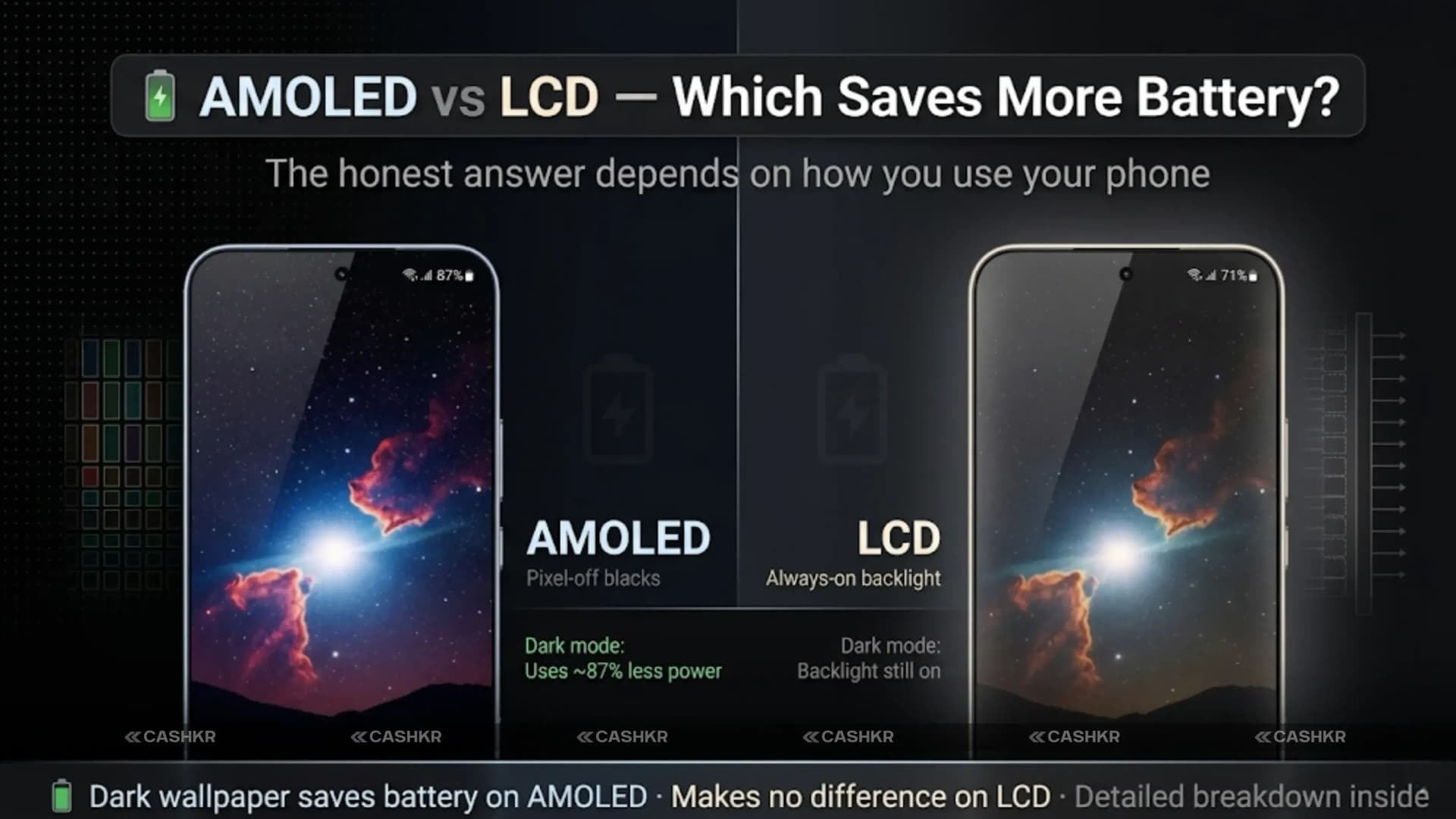
AMOLED vs LCD Display: which saves more battery and why it matters.

Get the Cashkr app for faster payouts

You are looking at two phones. Both have excellent reviews. Both are the same price. One has an AMOLED display. One has an LCD. The spec sheet says AMOLED saves battery. But is that always true?
The honest answer is: it depends on how you use your phone. AMOLED displays are more efficient in dark mode, dark content, and always-on scenarios. LCD displays are more predictable and consume power at a flatter rate regardless of what is on screen. Neither technology is universally more efficient for every user in every situation.
This guide explains how both display technologies actually work at the hardware level, which scenarios genuinely favor AMOLED battery efficiency, when LCD is the more sensible choice, and which display type you should be looking for based on your real daily usage.
Quick answer: AMOLED saves 10 to 20 percent more battery than LCD for most everyday users who use dark mode. LCD is more efficient than AMOLED when displaying bright white content. For dark mode users, AMOLED wins clearly. For users who prefer light mode or bright content, the battery advantage is much smaller.
Understanding why these two display types consume battery differently requires knowing how each one produces light.
How LCD Works: A fluorescent or LED backlight illuminates the entire screen from behind. Liquid crystals in each pixel rotate to block or allow different amounts of that backlight to pass through. Even a completely black pixel on an LCD screen is just a crystal blocking the backlight. The backlight behind it is still running at full or near-full power.
How AMOLED Works: Each pixel contains its own organic light-emitting diode. When a pixel needs to display content, it lights up. When a pixel needs to be black, it turns off completely. There is no backlight. The display only consumes power proportional to how many pixels are lit and how brightly they need to shine.
This fundamental difference drives everything else in the battery comparison. An LCD screen consuming 200mW to power a full backlight consumes approximately the same power whether it shows a black screen or a white screen. An AMOLED screen consuming 200 mW on a white screen might consume 40 mW on a black screen, because 90 percent of the pixels have been turned off.
The implication is direct: AMOLED battery efficiency is content-dependent. LCD battery efficiency is content-independent. Both technologies have scenarios where they are the more efficient choice.
Here is how both displays actually perform across the usage scenarios that make up a typical Indian smartphone day:
| Usage Scenario | AMOLED Battery Impact | LCD Battery Impact |
|---|---|---|
| Dark mode browsing | Very efficient (black pixels OFF) | No saving (backlight always on) |
| Always-On display | Efficient (only lit pixels draw power) | Not practical, high drain |
| Light content and photos | Higher drain than LCD | Consistent moderate drain |
| Pure white screen |
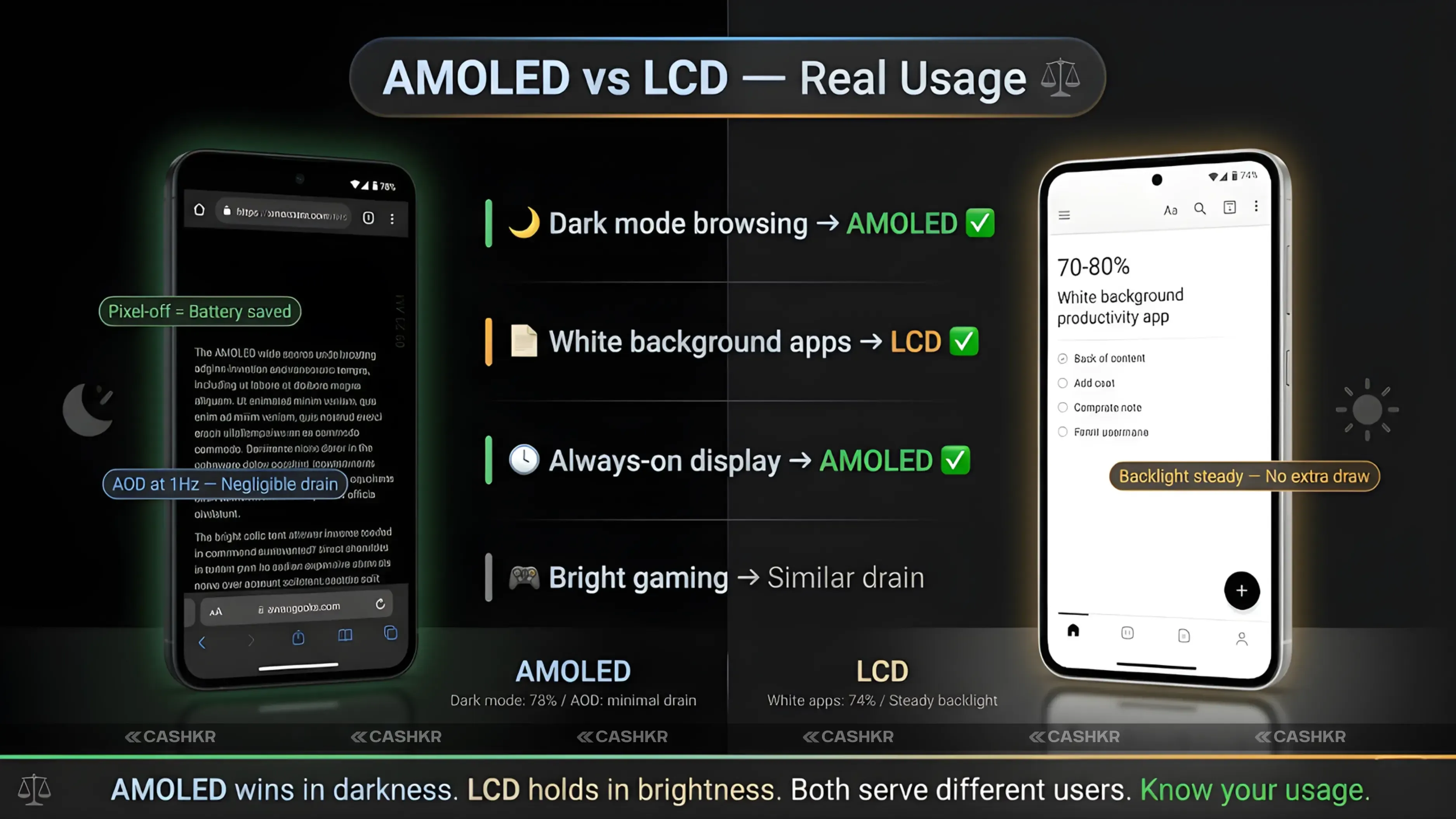
The table shows why the AMOLED vs LCD battery debate does not have a single universal answer. If your typical phone day involves WhatsApp in dark mode, reading with dark backgrounds, YouTube videos with dark scenes, and a clock on the always-on display, AMOLED can save 20 to 30 percent or more battery compared to LCD. If your typical day involves reading with white backgrounds, browsing web pages in light mode, and playing colorful games, the AMOLED advantage shrinks to 5 to 10 percent or less.
Also Read: iPhone 18 Pro New Colors Leaked: Dark Red and No Black
Dark mode on an AMOLED phone is the single most impactful feature for improving battery life, and it only works as claimed on AMOLED.
When an AMOLED phone switches to dark mode, the apps replace white and light grey backgrounds with pure black or very dark grey. On an AMOLED panel, a pure black background means the pixels displaying that background are switched off entirely. They consume zero power. The UI chrome, text, and icons floating over that black background use minimal pixels and consume relatively little power.
When the same dark mode is enabled on an LCD phone, the visual result looks identical to the user. The screen appears dark. But underneath, the backlight is still illuminated at the same intensity as before. The liquid crystals are blocking almost all the light, but the backlight is running. LCD dark mode delivers a visual improvement in contrast and reduced eye strain, but it delivers minimal battery savings.
Measured in real-world testing on flagship phones: an AMOLED device with dark mode enabled across all apps typically uses 25 to 40 percent less display power than the same device in light mode. An LCD device with dark mode enabled typically uses 5 to 10 percent less display power than light mode.
Dark mode practical tip: Enable dark mode system-wide on an AMOLED phone (Settings, Display, Dark Mode) and also enable dark mode individually in WhatsApp, Instagram, Chrome, YouTube, Twitter, and Gmail. Each app that switches to dark backgrounds saves AMOLED power proportionally. On a flagship AMOLED phone used primarily in dark mode, screen-on time can increase by 1.5 to 2 hours compared to light mode.
There are genuine scenarios where LCD is more battery-efficient than AMOLED, and these deserve honest coverage.
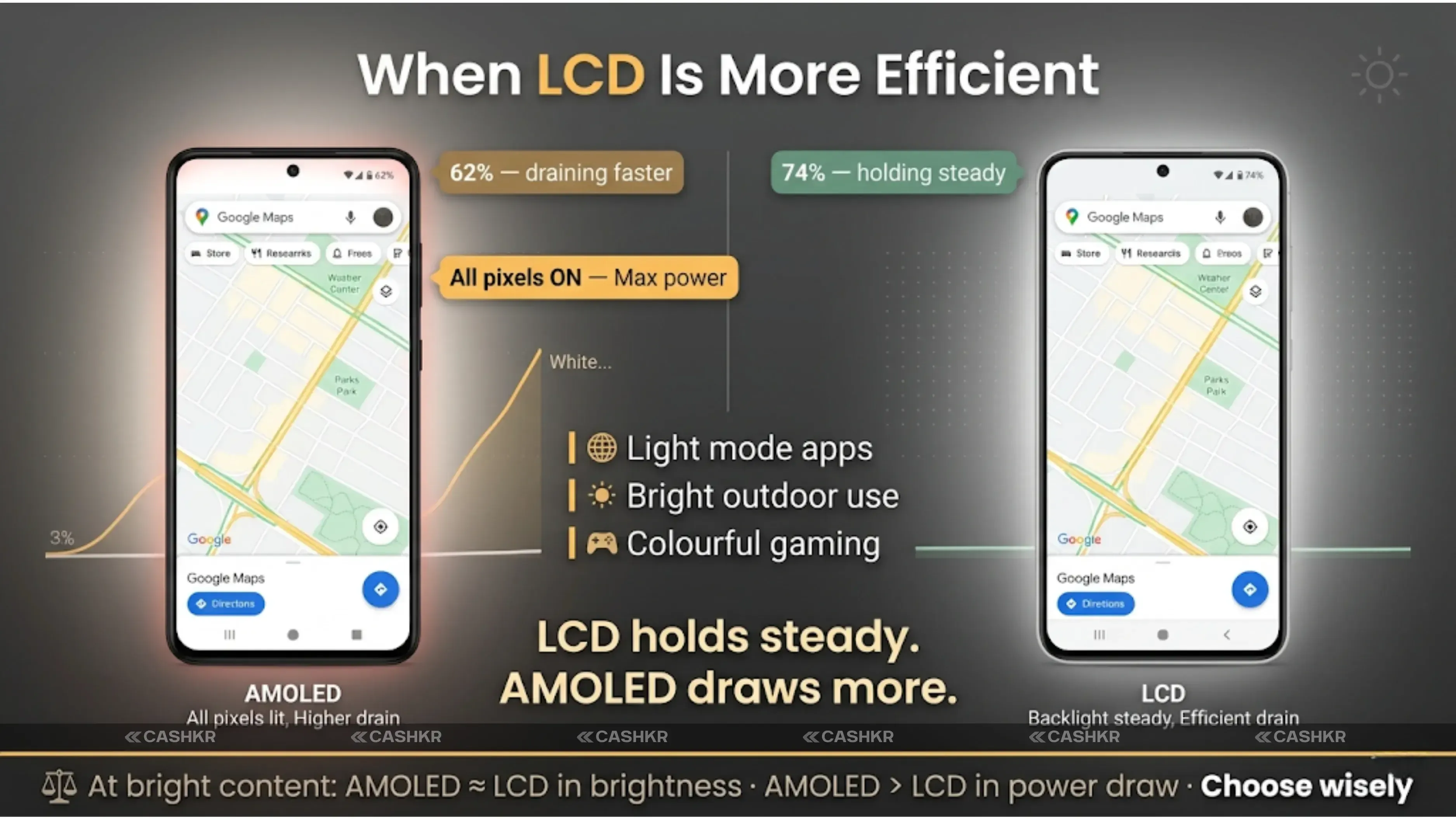
The most significant is white and bright content. Many popular apps default to white backgrounds: Google Docs, most news websites, Google Maps with standard map mode, WhatsApp in light mode, PDF readers, and Chrome on most websites. When an AMOLED display shows a predominantly white page, almost all pixels are fully lit at maximum individual power draw. This draws more power than an LCD backlight illuminating the same white page.
High-brightness outdoor use is another scenario where LCD can match or beat AMOLED. Budget and mid-range AMOLED screens peak at 800 to 1,000 nits. Budget and midrange LCD screens often reach 700–900 nits consistently. But the power cost to reach these brightness levels is proportionally higher on AMOLED because every pixel is independently generating light at maximum intensity. An LCD's single efficient backlight can sustain high brightness at a lower power cost per nit in some scenarios.
Bright gaming is a third scenario. Colorful gaming content with bright environments, vivid graphics, and fast-moving high-saturation visuals keeps AMOLED pixels lit at close to full power. In extended gaming sessions at high brightness, AMOLED and LCD can consume comparable power despite AMOLED's reputation for efficiency.
Also Read: OnePlus Nord 6 Price in India: 9000mAh and Snapdragon 8s
The white screen trap: If you use light-mode WhatsApp and Google Maps, read articles with white backgrounds, and use Google Photos at full brightness, you are in AMOLED's least efficient usage pattern. At this usage profile, the AMOLED battery advantage over a decent LCD phone may be negligible or reversed. Match your display choice to your actual usage rather than spec-sheet claims.
| Feature | AMOLED | LCD |
|---|---|---|
| Contrast ratio | Infinite (true blacks) | Limited by backlight bleed |
| Black depth | True black (pixel off) | Dark grey at best |
| Colour vibrancy | More vivid and saturated | Accurate and natural |
| Peak brightness | Up to 6,000 plus nits on flagships |
The battery efficiency question is only part of the AMOLED vs. LCD decision. Display quality differences are significant and visible in daily use.
AMOLED's infinite contrast ratio and true black capability make dark scenes in movies, games, and photos look dramatically better than on LCD. A night sky in a game looks genuinely black on AMOLED and dark grey on LCD. A photo taken at night renders differently. For content consumption quality, AMOLED is the superior panel technology.
LCD's consistent brightness and color accuracy make it genuinely competitive for outdoor readability at budget price points. Budget AMOLED screens, which appear in phones under Rs. 15,000 to Rs. 18,000, are often dimmer and less color-accurate than budget IPS LCD alternatives. The AMOLED quality advantage is most visible on mid-range and flagship panels where the manufacturing quality is high. On budget AMOLED, the advantage over IPS LCD narrows significantly.
AMOLED's per-pixel power model creates one significant long-term concern that LCD does not share: burn-in.
When certain pixels display the same static content at high brightness for thousands of hours, the organic compounds in those AMOLED pixels degrade slightly faster than surrounding pixels. Over time, this process can leave a faint ghost image of the static content even when the display shows something else. Common sources include navigation bars, notification bars, and game HUDs.
Modern AMOLED displays use several techniques to mitigate burn-in: pixel shifting (moving all content by a few pixels periodically), reducing the brightness of static elements, and varying the pixel arrangement to distribute wear. Most flagship AMOLED phones used normally for three to four years do not show visible burn-in. But it is a genuine consideration for users who run navigation apps for hours daily or keep the always-on display at maximum brightness permanently.
LCD panels have no burn-in mechanism. The liquid crystals and backlight can degrade over many years but do not leave ghost images from static content. For buyers who keep phones for four to five years and use navigation apps intensively, this is a relevant practical difference.
Burn-in prevention on AMOLED: Avoid keeping brightness at its maximum all the time. Use adaptive brightness. Enable the phone's built-in pixel refresh or screen burn correction feature if available. Avoid keeping a single static image or navigation screen at full brightness for hours consecutively. Modern AMOLED phones handle normal usage without burn-in for the typical two-to-three-year ownership cycle.
Samsung's Super AMOLED integrates the touch-sensing layer directly into the display panel rather than adding it as a separate layer on top. This removes one layer of glass and reduces reflectivity.
For battery life, Super AMOLED delivers no measurable improvement over standard AMOLED. The touch layer integration reduces physical thickness and improves readability under ambient light by reducing surface reflections, but the pixels generating light are the same AMOLED technology in both cases. The power consumption difference between Super AMOLED and standard AMOLED is negligible for practical purposes.
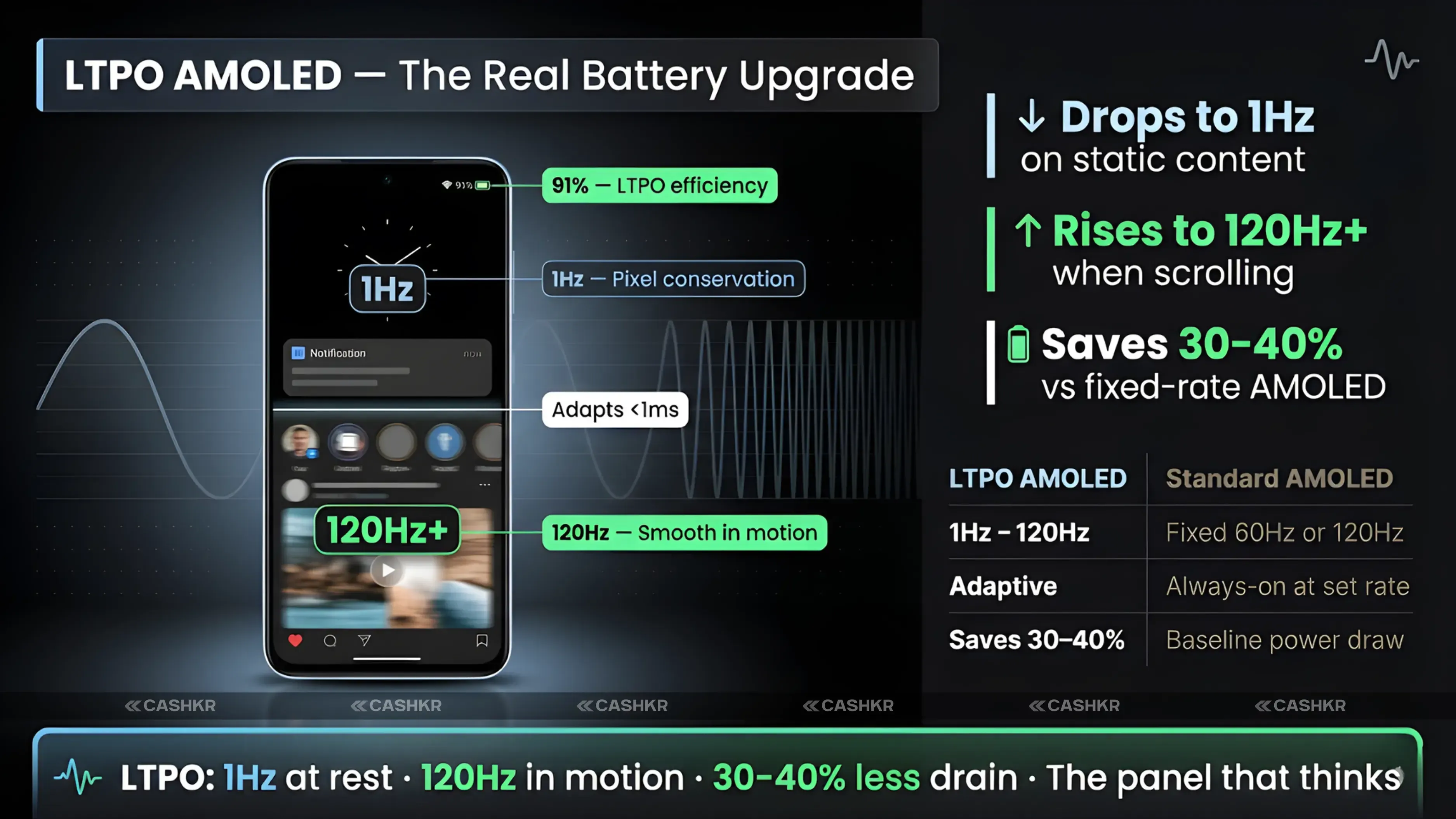
LTPO AMOLED, which is a different specification, does provide battery benefits. LTPO stands for Low Temperature Polycrystalline Oxide, and it allows the display refresh rate to drop dynamically from 120Hz or 144Hz down to 1Hz when showing static content. At 1Hz refresh, the display power consumption drops dramatically compared to 120Hz. This is why LTPO AMOLED flagships show better battery life than standard 120Hz AMOLED phones despite having larger, brighter displays.
LTPO is the real battery upgrade: If battery life from an AMOLED display is a priority, look for LTPO AMOLED specifically rather than standard AMOLED. LTPO allows the display to refresh at 1Hz when reading or showing static content and climbs to 120Hz or higher when scrolling. This adaptive range saves significantly more battery than any fixed-rate AMOLED display.
Choose AMOLED if you use dark mode consistently. This is where AMOLED delivers its most significant and real battery advantage. If dark mode is your default across WhatsApp, Instagram, Chrome, and system UI, AMOLED saves meaningful battery every day.
Choose AMOLED if you want the best possible media consumption experience. Movies, games, and photos look genuinely better on a well-calibrated AMOLED panel due to true blacks and vivid colors.
Choose AMOLED if you want an always-on display for time and notifications. AMOLED can show a small always-on widget consuming minimal power because only a few pixels are lit. LCD cannot do this task efficiently.
Choose LCD if you are on a tight budget under Rs. 12,000 to Rs. 15,000. Budget AMOLED panels at this price tier are often dimmer and lower quality than budget IPS LCD alternatives. LCD at this price range is the more reliable panel technology.
Choose LCD if you primarily use your phone outdoors at maximum brightness with light mode apps. Consistent backlight efficiency at high brightness can match AMOLED in this specific scenario.
Choose LTPO AMOLED for maximum battery efficiency: if battery life is the top priority and budget allows a mid-range or flagship phone, LTPO AMOLED gives the best possible balance of display quality and power efficiency simultaneously.
AMOLED saves more battery than LCD for most Indian smartphone users in 2026. This statement holds because most users spend significant screen time on social media, messaging apps, and content platforms that all support dark mode, and dark mode on AMOLED is genuinely and meaningfully more efficient than dark mode on LCD.
The asterisk is this: AMOLED's battery advantage is tied to your content and settings choices. It is not automatic. An AMOLED user who leaves everything in light mode and uses white-background apps all day does not gain much battery benefit over a good LCD phone. An AMOLED user who enables dark mode system-wide and across all supported apps can gain one to two additional hours of screen-on time daily.
For display quality regardless of battery, AMOLED wins at mid-range and above. For budget buyers under Rs. 15,000, IPS LCD remains a viable and sometimes superior option to the lower-grade AMOLED panels that appear at that price point.
The bottom line for 2026: if battery and quality both matter, choose AMOLED and enable dark mode. If you are budget-shopping, compare actual panel quality rather than defaulting to AMOLED just for the label.
The one-line answer: AMOLED saves more battery than LCD when using dark mode, which most users should. Enable dark mode system-wide on your AMOLED phone to see the real benefit. AMOLED also wins on display quality at every price tier above Rs. 15,000. LCD remains relevant only in budget phones, where the manufacturing quality of AMOLED panels is lower.
1. Which is better for battery life, AMOLED or LCD?
AMOLED is better for battery life in most daily usage scenarios, particularly with dark mode enabled. AMOLED pixels turn off completely for black areas, consuming zero power. LCD's backlight stays on regardless of screen content. For mixed usage with dark mode, AMOLED saves 10 to 20 percent more battery than LCD.
2. Does dark mode actually save battery on AMOLED phones?
Yes, significantly. Dark mode on an AMOLED phone switches app backgrounds to black or very dark colors, which turns those pixels off. This reduces screen power consumption by 25 to 40 percent compared to light mode. On an LCD phone, dark mode saves 5 to 10 percent at most because the backlight stays on behind the dark pixels.
3. When does LCD save more battery than AMOLED?
LCD is more efficient when displaying predominantly white or very bright content. White screens on AMOLED require every pixel to emit maximum light, which can draw more power than an LCD backlight showing the same content. If you use light mode apps, browse white-background websites, and read documents in light mode, the AMOLED battery advantage shrinks significantly.
4. What is the difference between AMOLED and LTPO AMOLED for batteries?
Standard AMOLED operates at a fixed high refresh rate (120Hz or 144Hz) all the time. LTPO AMOLED can drop to 1Hz when the screen is showing static content and rise to 120Hz or higher when scrolling or gaming. This adaptive range reduces display power consumption by 30 to 40 percent compared to fixed-rate AMOLED in everyday use.
5. Does AMOLED burn in over time?
Yes, AMOLED can develop burn-in where static content displayed at high brightness for thousands of hours leaves a faint ghost image. Modern AMOLED phones use pixel-shifting and brightness management to reduce this risk. For most users on a two-to-three-year ownership cycle, burn-in is not a practical problem. Intensive navigation app users or those who keep always-on displays at maximum brightness for years face higher risk.
6. Is AMOLED better than LCD for eyes?
AMOLED with high-rate PWM dimming (3,840Hz and above) is better for eyes because it reduces the flicker that can cause eye strain at low brightness. Many budget AMOLED screens use 60Hz PWM, which can be more fatiguing than IPS LCD. For eye comfort, look for AMOLED phones with high PWM dimming rates (1,920 Hz plus is the minimum; 3,840 Hz is ideal) rather than just any AMOLED panel.
7. Which display is better for gaming, AMOLED or LCD?
AMOLED at 120Hz or above delivers better visual quality for gaming due to true blacks, vivid colors, and infinite contrast. For competitive gaming requiring minimal latency, both AMOLED and LCD at the same refresh rate perform similarly. AMOLED may drain more battery than LCD during bright gaming sessions because vivid game graphics keep pixels lit at high intensity.
8. Is AMOLED or LCD better for outdoor use in India?
High-end AMOLED displays with 2,000 nits or above peak brightness outperform most LCD panels in direct Indian sunlight. Budget AMOLED panels with 800 to 1,000 nits are comparable to or slightly below budget IPS LCD in outdoor readability. For outdoor performance, check the peak brightness number rather than just the panel type.
9. What is Super AMOLED, and is it different from AMOLED for battery?
Super AMOLED integrates the touch-sensing layer into the display panel rather than adding it separately. For battery life, the difference is negligible. Super AMOLED reduces reflectivity and physical thickness but does not change how pixels emit light. Battery performance between Super AMOLEDs and standard AMOLEDs of similar generation and resolution is not measurably different.
10. Should I choose AMOLED or LCD for a budget phone under Rs. 15,000?
At under Rs. 15,000, the AMOLED panels are a lower manufacturing grade than panels found in mid-range and flagship phones. Some IPS LCD alternatives at this price actually deliver brighter, more consistent displays than budget AMOLED. Look at specific panel brightness and color accuracy reviews rather than defaulting to AMOLED purely for the label. Above Rs. 18,000, AMOLED quality consistently surpasses IPS LCD.
If you want to sell your old devices, then click here.
Sell with Cashkr
Cashkr buys used devices at a fair price with free doorstep pickup and same-day payment across 2,000+ pincodes. Get an upfront quote in seconds.
Sell Old Phone OnlineCheck your phone's value in seconds
Written by
Top 5 gaming mobile phones in India for March 2026 ranked and compared.
Top 5 phone selling apps offering the best deals in India
| Standard power draw |
| Video (dark scenes) | Efficient, black areas save power | Consistent drain regardless |
| Gaming (bright graphics) | Higher drain due to vivid pixels | More predictable drain |
| Low brightness reading | Very efficient with dark backgrounds | Moderate, backlight dims but stays on |
| Typical mixed daily use | 10 to 20 percent better than LCD overall | Consistent but higher baseline |
| Usually 500 to 1,000 nits |
| Sunlight visibility | Good on flagships, less on budget | Consistent across price range |
| Viewing angles | Excellent | Very good (IPS) |
| Burn-in risk | Yes with static content over time | None |
| Price tier | Mid-range to flagship | Budget to mid-range |
Vivo V70 vs Vivo V60 comparison in 2026. Compare specs, camera