iOS 26.4 Is Out Now: Here Is Everything That Is New on Your iPhone
Apple just released iOS 26.4, and you can download it on your iPhone now.
This update isn’t a huge overhaul. Advanced Siri and the next wave of Apple Intelligence features aren’t here yet. Still, iOS 26.4 brings several useful updates, especially if you use Apple Music often.
The main highlights include AI-generated playlists in Apple Music, concert discovery, offline song recognition, eight new emojis, and accessibility improvements that make the iPhone easier for more people to use.
Here’s a full breakdown of what’s new in iOS 26.4.
What’s new in iOS 26.4: AI playlists in Apple Music, concert discovery, offline song recognition, 8 new emojis, accessibility upgrades, Freeform improvements, and smarter reminders and Smart Lists.
How to Install iOS 26.4 on Your iPhone
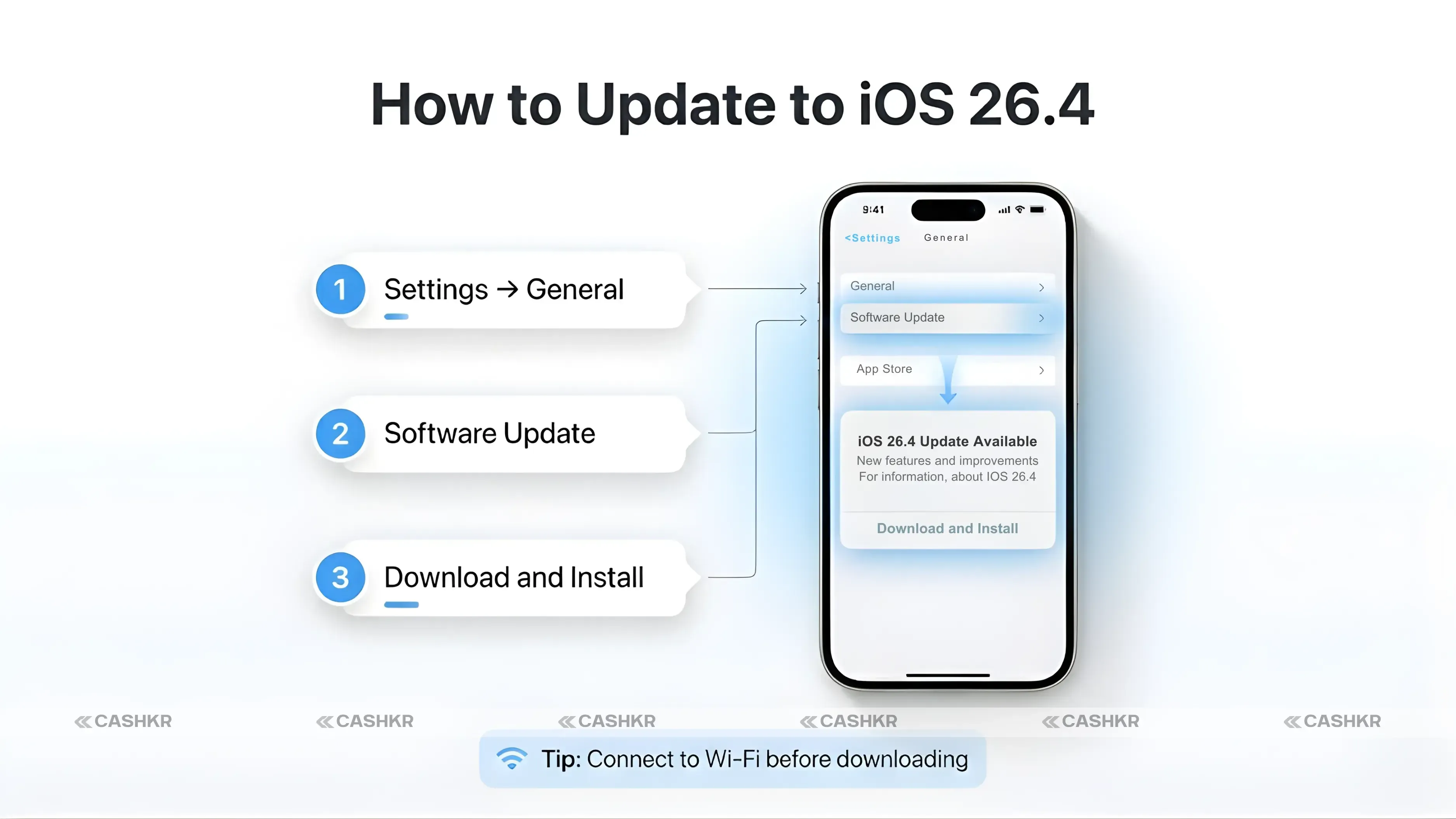
First, here’s how to update your device. the Settings app.
Tap General.
Tap Software Update.
Your iPhone will check for iOS 26.4.
Tap Download and Install.
Enter your passcode and follow the prompts.
The update is free and usually takes 10 to 20 minutes, depending on your internet speed. Make sure your phone has at least 50% battery or is plugged in before you start.
Tip: Connect to Wi-Fi before downloading. iOS updates are usually 500MB to 1GB and can use a lot of mobile data if you download them over cellular.
iOS 26.4 Apple Music: AI-Generated Playlists Are Here
Most people will notice this feature right away.
Apple Music now has a feature called Playlist Playground. It uses AI to make playlists based on what you type. Just describe what you want, and it creates a playlist with a title, description, and track list.
You can keep your prompts simple or get as detailed as you like. For example, “upbeat songs for a morning run” gives you an energetic playlist. A more specific prompt, like “late 90s R&B for a Sunday afternoon in the kitchen,” creates a playlist that fits that exact mood.
The AI doesn’t just pick random songs. It checks your listening history, your library, and the wider Apple Music catalog to make playlists that fit you. Two people using the same prompt will probably get different playlists based on their own listening habits.
You can edit the playlist after it’s made. If the AI misses the mark or you want to change a few songs, you can use the usual playlist editing tools.
Note: Playlist Playground is still in beta. You can use it now, but Apple is still improving it based on feedback. Some results might be inconsistent as the system learns.
Feature Name
Playlist Playground
Location
Inside Apple Music app
How It Works
Type a prompt describing your mood or activity
Output
Full playlist with title, description and tracks
Personalisation
Uses your listening history to customise results
Status
Currently in beta
More Apple Music Upgrades in iOS 26.4
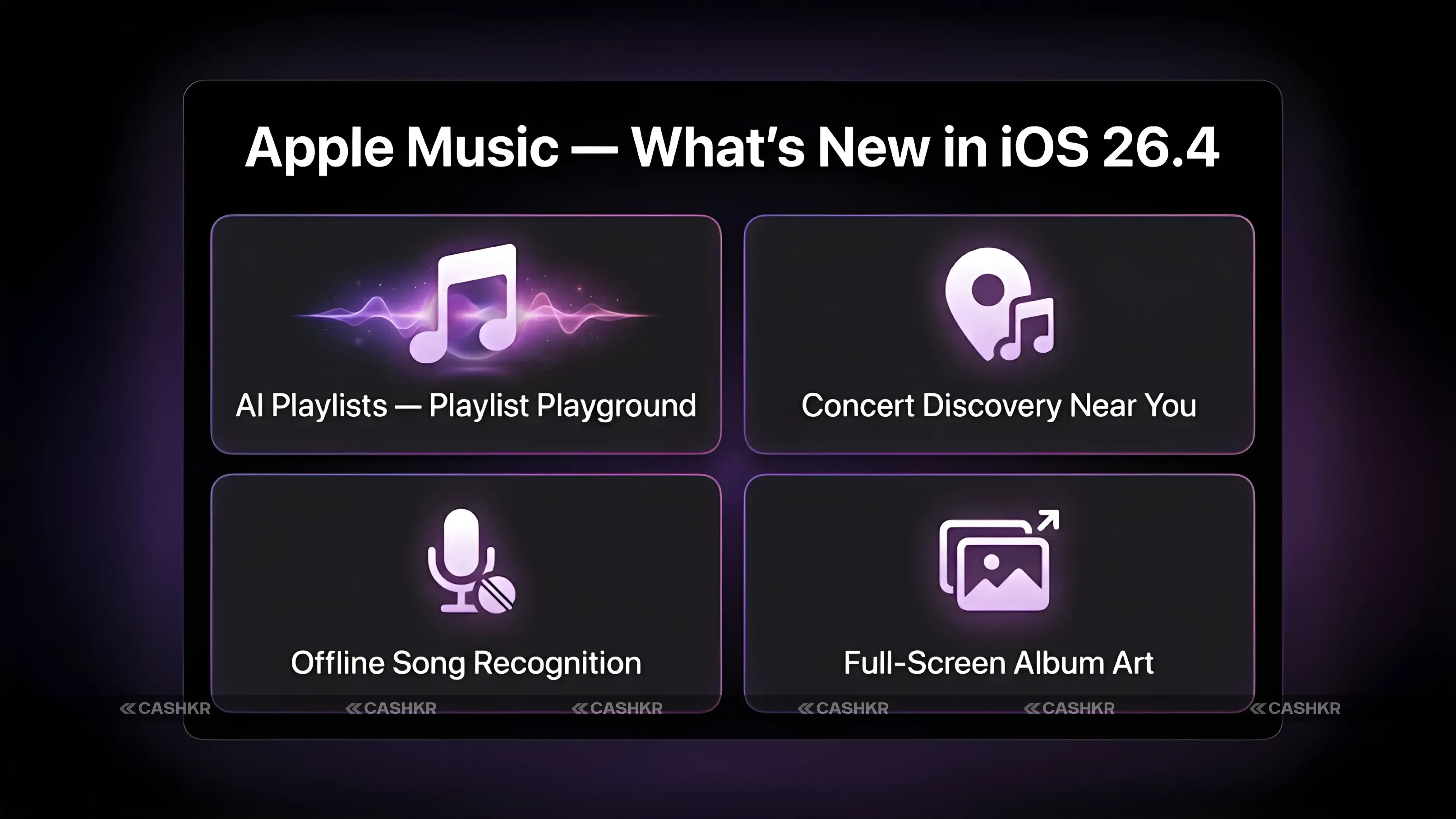
Playlist Playground isn’t the only Apple Music upgrade in this update. Three other features stand out too.
Concert Discovery
Apple Music now shows you upcoming live concerts from artists you already listen to.
The feature scans your listening history and surfaces nearby shows you might actually want to attend. If you stream a particular artist regularly, Apple Music will flag when they are playing near you, so you don't have to wait to find out through social media or a web search.
For fans who go to live shows, this is a practical new feature. It links your streaming habits to real-world events in a way that feels natural.
To find it, open Apple Music, go to the Browse or Listen Now tab, and look for the concerts section. It shows events near you based on your library and listening habits.
Offline Song Recognition
This feature is less flashy but very useful.
Now you can identify songs even without internet. If you hear a song you want to know, your device recognizes it locally, even with no signal. The result is saved and shown to you when you reconnect.
Before, song recognition needed an internet connection. Now it works even in places with poor or no signal, which is often when you hear music you want to identify.
Full-Screen Backgrounds and Ambient Music Widget
Apple Music album and playlist pages now show full-screen artwork as the background. Instead of a small image at the top, the artwork fills the whole screen, making browsing playlists feel more immersive.
The new Ambient Music Widget lets you quickly access curated playlists from your home or lock screen. Categories include Sleep, Chill, Productivity, and Wellbeing. Just tap the widget to start the right playlist without opening the app.
AI Playlists
Describe a mood or activity, get a full playlist (beta)
Concert Discovery
See live shows from artists in your library near you
Offline Recognition
Identify songs without internet, view results later
Full-Screen Art
Album and playlist pages show artwork across the whole screen
Ambient Widget
Quick access to Sleep, Chill, Productivity and Wellbeing playlists
8 New Emojis in iOS 26.4
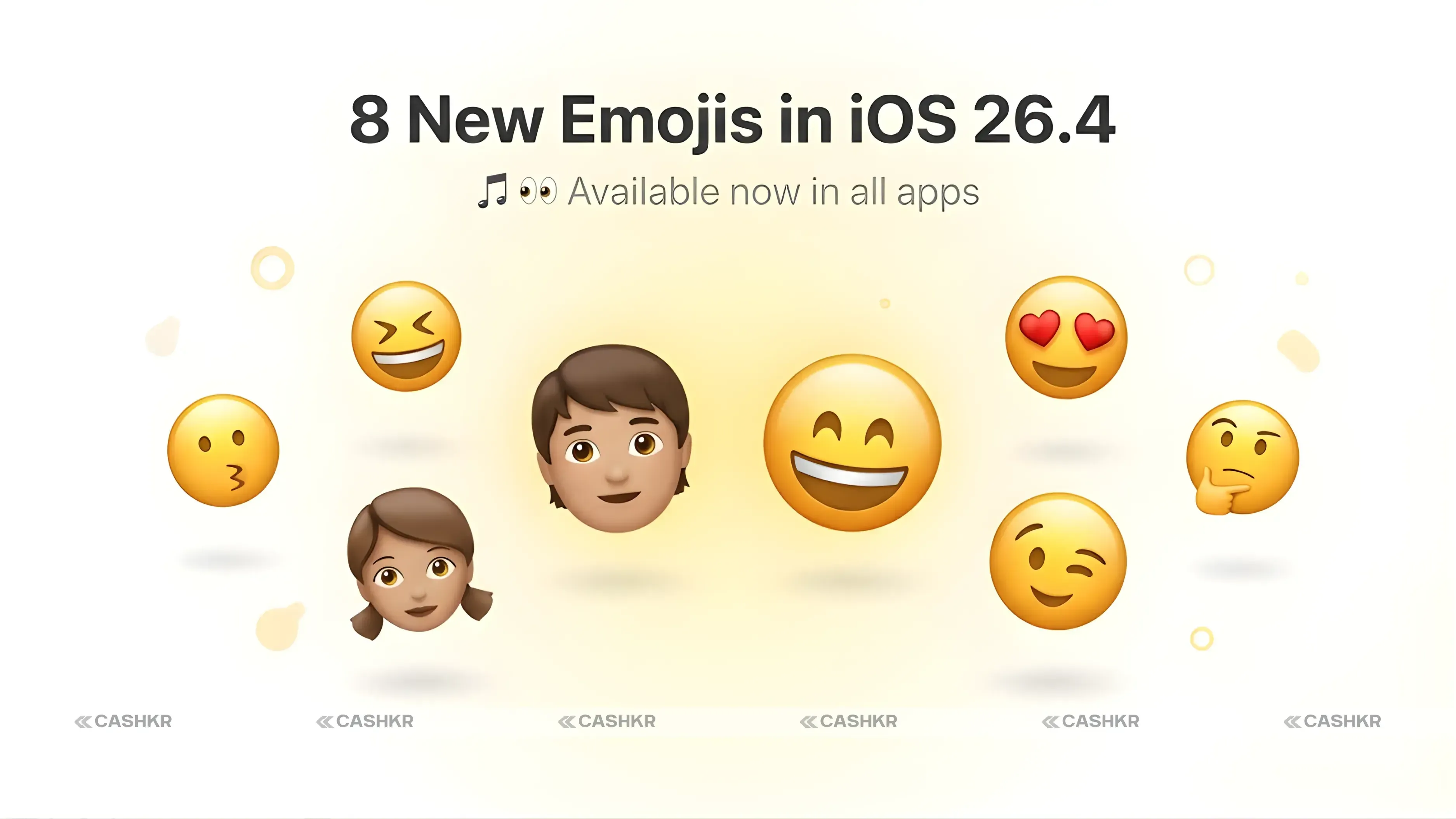
This update adds eight new emojis.
The new emojis include an orca, a trombone, a ballet dancer, a landslide, and a distorted face, plus three more that haven’t been fully detailed yet. Apple usually adds new emojis with major iOS updates as part of the Unicode Consortium’s annual refresh.
You’ll see the new emojis right after installing the update, in all text fields—like Messages, WhatsApp, Instagram, and any other app where you type.
The new emojis work right away after the update. You don’t need to do anything extra—just open any messaging app and they’ll show up in your emoji keyboard.
Accessibility Improvements in iOS 26.4
Apple made three important accessibility changes in this update.
Reduce Bright Effects: This new setting cuts down on flashing or strobing effects during system use. It gives users who are sensitive to flashing lights or have photosensitive conditions more control, without turning off all animations.
Better Subtitle Controls: You now have more ways to customize subtitles and captions. You can adjust the size, font, background color, and position in supported apps. This helps users who need captions for accessibility or just prefer them when watching videos.
Improved Reduce Motion: The Reduce Motion setting now works better with the Liquid Glass interface. If you like fewer animations, this setting now limits movement more fully across the new interface elements in recent iOS versions.
These updates show Apple’s commitment to making iOS better for users with different accessibility needs. They may not be flashy, but for those who need them, they make a real difference in daily iPhone use.
Other Features and Improvements in iOS 26.4
There are also several smaller updates that improve certain apps and workflows.
Freeform: The Freeform whiteboard app now has new image creation and editing tools. You can make and change images right in Freeform without needing another app.
Reminders: You can now mark reminders as urgent. Urgent reminders get a visual marker and show up more clearly in your lists, so important tasks stand out.
Smart Lists: Filtering options are better now. You can set more specific rules for how items show up in your Smart Lists, making them more useful for managing tasks.
Keyboard: Apple improved keyboard accuracy in this update. The correction and prediction tools are better, so you should see fewer autocorrect mistakes and more accurate word suggestions, especially for common phrases.
What Is Not in iOS 26.4
This is a solid update, but some features iPhone users have been waiting for are still missing.
Advanced Siri with conversational AI and deeper Apple Intelligence features aren’t in iOS 26.4. Apple has been adding Apple Intelligence features in recent updates, but the advanced Siri improvements shown at WWDC aren’t here yet. You were hoping this update would bring a smarter Siri or major AI assistant features; you will need to wait for a future release. Apple has not confirmed which update will include these features.
No advanced Siri yet: iOS 26.4 doesn’t include the new AI-powered Siri or advanced Apple Intelligence features. These are expected in a future update.
iOS 26.4: Everything New at a Glance
AI Playlists
Playlist Playground in Apple Music (beta)
Concert Discovery
Find live shows from artists in your library
Offline Recognition
Identify songs without internet connection
Full-Screen Art
Immersive album and playlist backgrounds
Ambient Widget
Home screen widget for curated background playlists
New Emojis
8 new emojis including orca, trombone, ballet dancer
Reduce Bright Effects
New accessibility setting for flashing visuals
Should You Install iOS 26.4?
Update now if you use Apple Music a lot. Concert discovery, AI playlists, and offline song recognition are all genuinely useful.
Update now if you rely on accessibility features. The new Reduce Bright Effects and better subtitle controls are meaningful upgrades.
If you don’t use Apple Music much, and the new emojis or system tweaks are the main draw, update when it’s convenient for you.
There’s no reason to wait—this is a free update with no major bugs. Installing it has no downside.
Final Verdict
iOS 26.4 is a focused and practical update.
It’s not the big AI update iPhone users have been waiting for. Advanced Siri and deeper Apple Intelligence features are still on the way. But iOS 26.4 does bring a better Apple Music experience, helpful new accessibility tools, eight new emojis, and a bunch of small improvements that make daily iPhone use a bit smoother.
If you subscribe to Apple Music, the AI playlist feature alone makes this update worth installing right away. For everyone else, it’s still worth taking 15 minutes to download and install when you get the chance.
Bottom line: iOS 26.4 is a solid update with a big focus on Apple Music. It’s not the major AI upgrade some hoped for, but it brings a lot of practical improvements. Install it when you get a chance.
FAQs
1. What is new in iOS 26.4?
iOS 26.4 brings AI-generated playlists in Apple Music (called Playlist Playground), concert discovery, offline song recognition, full-screen album artwork, an Ambient Music Widget, 8 new emojis, accessibility improvements, and refinements to Freeform, Reminders, Smart Lists, and the keyboard.
2. How do I update to iOS 26.4?
Go to Settings> General> Software Update. Your iPhone will detect the update. Tap Download and Install, enter your passcode, and follow the on-screen steps. The process takes around 10 to 20 minutes.
3. What is Playlist Playground in Apple Music?
Playlist Playground is an AI-powered feature that creates personalised playlists based on a text prompt you type. Describe a mood, activity, or theme, and the AI generates a full playlist with tracks, a title, and a description. It is currently in beta.
4. What are the new emojis in iOS 26.4?
iOS 26.4 adds 8 new emojis, including an orca, a trombone, a ballet dancer, a landslide, and a distorted face. The new emojis are available immediately in all apps after installing the update.
5. Does iOS 26.4 include advanced Siri or Apple Intelligence?
No. iOS 26.4 does not include the advanced Siri improvements or the next generation of Apple Intelligence features. These are expected in a future iOS update.
6. What is offline song recognition in iOS 26.4?
With iOS 26.4, you can identify songs without an active internet connection. The recognition happens locally on your device, and the results are saved and displayed when you reconnect to the internet.
7. What is the Ambient Music Widget in iOS 26.4?
The Ambient Music Widget gives you quick access to curated playlists from your home screen or lock screen. Categories include Sleep, Chill, Productivity, and Wellbeing, allowing you to launch the right background music with one tap.
8. What accessibility features are new in iOS 26.4?
Three accessibility improvements are included: Reduce Bright Effects minimises flashing visuals, Better Subtitle Controls lets you customise caption appearance more thoroughly, and Improved Reduce Motion more comprehensively limits animations in the Liquid Glass interface.
9. Is iOS 26.4 worth installing?
Yes. It is a free update with no known significant issues. Apple Music users in particular will find several useful new features. The accessibility improvements and general system refinements benefit all users.
10. Which iPhones support iOS 26.4?
iOS 26.4 supports all iPhones that run iOS 26. Check Settings> General> Software Update to confirm whether your device is eligible for this update.
If you want to sell your old devices, then click here.
 Yaskar Jung ShahUpdated: Aug 5, 2026·13 min read