Is 128GB Enough for a Phone? And What to Do If You Chose Wrong
Storage is the one decision at purchase you cannot undo later. Most flagship and upper-mid-range phones dropped the microSD slot years ago, so whatever you picked in the shop is what you live with.
If you picked wrong, switching is cheaper than most people assume, for a structural reason worth understanding. This guide explains when switching makes sense, how to work out the real cost, and why acting early matters.
Disclosure: Cashkr is our own device buyback platform. We buy used phones, so "sell it and switch" is advice that suits us. We have not put buyback figures in this article; we cannot publish a number that will be true for your specific phone, and a made-up one would be worse than none. Every figure that matters here comes from a calculator, yours and ours.
Advertisement
How this guide was made: The usage thresholds and condition factors are what our inspection team sees at doorstep pickups across India. The pricing argument below is structural reasoning, not a claim about specific amounts.
For a lot of people, yes. For a growing number, no. The honest answer depends on four things:
Do you shoot video? This is the single biggest factor. A few minutes of 4K footage a week fills 128GB within a year. If you mostly take photos, it lasts much longer.
Do you install large games? Modern mobile games run to several gigabytes each and grow with updates. Three or four of them changes the arithmetic entirely.
Do you download for offline use? Netflix series, Spotify libraries, podcasts, maps. Streaming costs nothing in storage; downloading costs a lot.
Do you use cloud storage properly? If your photos live in Google Photos or iCloud rather than on the device, 128GB stretches considerably further.
If you answered no to the first three and yes to the last, 128GB is likely fine. If you answered yes to any of the first three, 256GB is the safer choice for most people in India, and it is the variant we would point most buyers toward.
Signs You Bought Too Little
Several of these together means the storage choice is costing you daily:
Storage-full warnings interrupting normal use
System updates failing to install for lack of space
The camera refusing to record, or stopping mid-recording
WhatsApp backups failing or switching themselves off
Apps closing unexpectedly, because there is no room for cache
Regularly going through photos and files to delete things
The phone feeling slower than it did when new
That last one surprises people. Flash storage slows measurably when it is nearly full, so a phone with 3GB free genuinely performs worse than the same phone with 40GB free. It is not your imagination and it is not the processor ageing.
Signs You Bought Too Much
Overpaying is less obvious but just as real:
Your usage has stayed well below half the capacity for several months
Most of your media lives in the cloud
You stream rather than download
You install few games
Your use is mostly messaging, calls, browsing and social media
If that is you, the premium you paid for the larger variant is sitting in unused flash memory. You can get part of it back.
Why Switching Costs Less Than You Expect
Here is the structural point, and it is the reason this article exists.
The price gap between storage variants is wider when new than when used.
Manufacturers price storage tiers with a healthy margin; the difference in what it costs them to fit 256GB instead of 128GB is much smaller than the difference they charge you. On the used market, that margin is not there. Buyers pay something extra for more storage, but not the full new-price premium.
So the gap you paid narrows by the time you resell. That narrowing is what makes switching viable: you are not recovering the whole premium, but you are recovering enough that changing variant costs less than the original price difference suggested.
This cuts both ways, which is worth being clear about:
Upgrading means the extra you pay for the larger variant new is partly offset by the resale value of the one you are selling.
Downgrading means you recover some, but not all, of the premium you overpaid.
Neither is free. You are paying a transaction cost for a decision made at purchase. The question is whether that cost is smaller than living with the wrong phone for its remaining life.
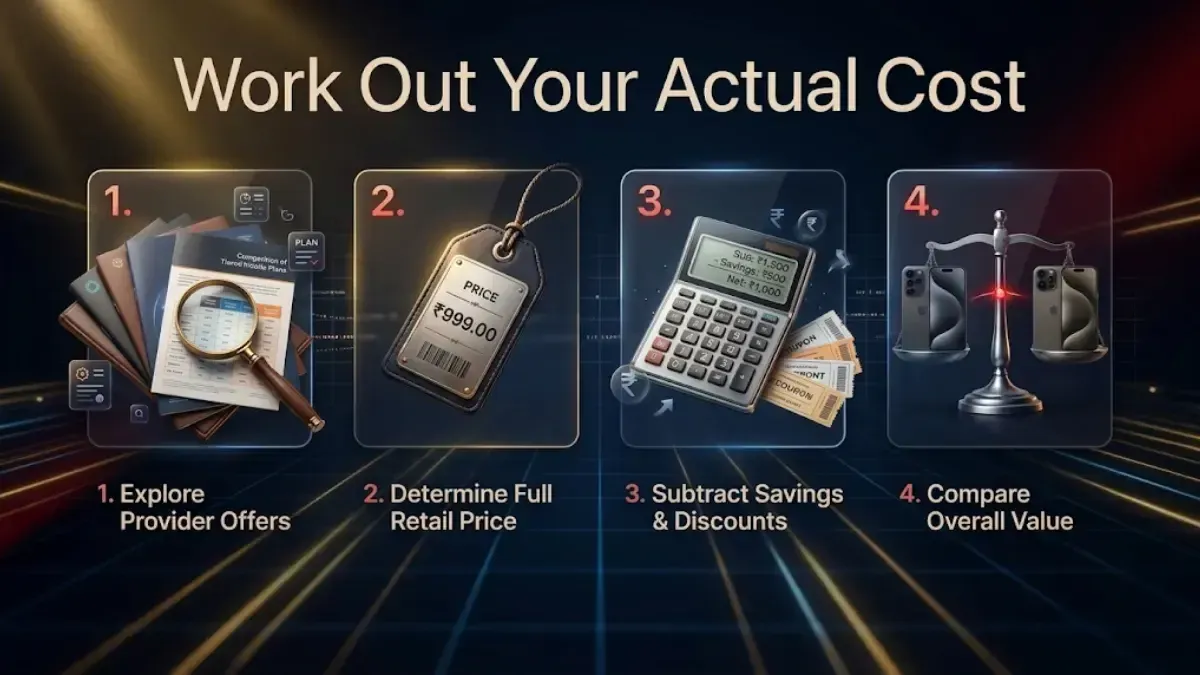
How to Work Out Your Actual Cost
Do this with real numbers rather than estimates, because the answer varies enormously by model.
Step 1. Get a buyback quote for your current phone and variant. Ours takes about a minute. Get a second quote elsewhere for the same described condition, so you know the figure is market-rate.
Step 2. Find the current retail price of the variant you want. Check Flipkart and Amazon directly; this changes weekly.
Step 3. Subtract. Retail price of the new variant minus buyback value of your current one is your real cost to switch.
Step 4. Weigh that against the alternative. If you are switching up, the alternative is however many months remain of managing storage, losing photos, and a phone that runs slower because it is full. If you are switching down, the alternative is leaving the premium in unused memory for the rest of the phone's life.
That comparison is the decision. Not the loss on paper.
Why the First Three Months Matter
Phones lose value fastest early, and the curve is steepest in the first year. Within roughly 30 to 90 days of purchase, three things work in your favour at once:
Condition. Minimal wear, battery health effectively as new, accessories and box still to hand. This is the highest condition grade the phone will ever be assessed at.
Demand. The model is current and wanted. Used demand for a phone is strongest before its successor exists.
Warranty. Still active, which matters to the next buyer.
After that window, all three erode, and the cost of switching rises. By six months it is meaningfully more expensive; by the time the successor is announced, materially so.
If a new generation of your phone is about to be announced, switch before the announcement rather than after. Used values step down as soon as buyers start waiting, before the new model even ships.
Before You Sell
Get this order right. It is the one thing that stops a sale completely.
1. Back up everything. Photos, videos, contacts, WhatsApp chats and media, app data, notes, documents. Verify the backup by signing in on another device. And move your authenticator app accounts to the new phone first 2FA codes are the thing people lose most painfully.
2. Remove your accounts. Google, and any brand account such as Samsung or Xiaomi. On iPhone: Settings → your name → Find My → switch off Find My iPhone, then Sign Out.
3. Remove the SIM, memory card and any eSIM profile.
4. Then factory reset.
Signing out has to come before the reset. Reset while still signed in and Activation Lock or Factory Reset Protection ties the phone to your account. The next owner cannot activate it and the pickup cannot complete. It is the most common reason a sale fails at the door.
5. Find the charger, cable and invoice, and remove the case and screen protector so the real condition is visible.
One Thing Switching Does Not Change
All storage variants of the same phone share the same processor, cameras, display and battery. Moving between them changes available space and nothing else.
That is what makes this a clean decision. You are not trading away performance or camera quality to fix a storage mistake; you are only paying the transaction cost.
FAQs
1. Is 128GB enough for a phone in 2026?
For light and moderate use, yes messaging, browsing, photos, streaming rather than downloading, with media backed up to the cloud. It becomes tight quickly if you record 4K video, install several large games, or download content for offline use. For most people buying today, 256GB is the safer choice.
2. How much does it cost to switch storage variants?
Retail price of the variant you want, minus the buyback value of the one you have. Both numbers depend on your specific model, so get a real quote rather than working from an estimate. We have deliberately not published figures here, because a range wide enough to cover every phone would be too wide to be useful.
3. Why is switching cheaper than the original price difference?
Because the premium manufacturers charge for extra storage when new is larger than the premium used buyers pay for it. That gap narrows on the used market, so you recover a reasonable share of what you paid for the storage.
4. When is the best time to switch?
Within about 30 to 90 days of purchase, while condition is excellent, the warranty is active and the model is still current. And before your phone's successor is announced, since used values drop as soon as buyers start waiting for the new one.
5. Does switching storage variants affect performance?
No. All variants of the same model use the same chipset, cameras, display and battery. The only difference is available space. A nearly-full phone does run slower than one with plenty free, so moving up can improve day-to-day speed for that reason.
6. Should I downgrade if I am barely using my storage?
It can make sense if your usage has stayed well under half the capacity for months and your media lives in the cloud. Run the numbers for your specific model first. If you are already using over half, downgrading risks recreating the problem you were avoiding.
7. Do I need the original box to sell?
No. It helps the condition assessment and adds to the price, but it is not required. The charger and cable matter more than the box.
8. Can the quote change when the phone is collected?
Ask the service directly before booking, because policies differ and this is where most complaints come from. Whatever the policy, describing faults accurately upfront is what keeps the final figure the same as the quote an optimistic description gets revised at the door.


 Yaskar Jung ShahUpdated: Sep 29, 2026·11 min read