How to Choose the Right Laptop for Your Needs: A Complete Buying Guide (2026)
Buying a new laptop can be confusing. The large number of processors, graphics cards, display types, and price categories makes it not always easy to find the perfect model. The best laptop is not the most expensive one; it is the one that best fits your everyday needs, your budget, and your future needs.
No matter if you’re a student, professional, gamer, content creator, or just use your laptop for everyday tasks, this guide will help you find the right laptop without spending too much.
Here’s a closer look at all the important factors, including processor, RAM, display, battery, and budget.
Quick summary: First, decide what you're going to do with your laptop. Students and casual users can get a Core i3 or Ryzen 3 with 8GB RAM and 256GB SSD for less than Rs. 40,000. For most office users, go for a Core i5 or Ryzen 5 with 16GB RAM and a 512GB SSD. This normally falls in the Rs. 40,000 to Rs. 70,000 range. If you are a creator or gamer, you need a Core i7 or Ryzen 7, a dedicated RTX GPU and 16GB to 32GB RAM, which will normally cost above Rs. 70,000. Prefer an SSD to an HDD, choose a Full HD or higher display, and aim for 8 to 12 hours of battery life.
Recommended for you
Sell with Cashkr
Got an old phone, laptop or tablet lying around?
Cashkr buys used devices at a fair price with free doorstep pickup and instant payment across 40+ Indian cities. Get an upfront quote in seconds.
What is your laptop most likely to be used for? Before you start looking at specs, ask yourself: This will assist you find out what hardware you really need.
Students
Ideal for online classes, assignments, web browsing, Microsoft Office, and streaming.
Recommended specifications:
Intel Core i3/Core 3 or AMD Ryzen 3
8GB RAM
Advertisement
256GB SSD
Full HD display
A laptop with these specs can handle all your academic work easily, so you won’t spend extra on features you don’t need.
Office Professionals
Ideal for Excel, video meetings, emails, multitasking, and business applications.
Recommended specifications:
Intel Core i5/Core Ultra 5 or Ryzen 5
16GB RAM
512GB SSD
Comfortable keyboard
Long battery life
Upgrading to 16GB RAM makes a real difference. Professionals often have many browser tabs, spreadsheets, and video calls open at the same time, and 16GB helps everything run smoothly.
Content Creators
If you do photo editing, video editing or graphic design, you will need more powerful hardware.
Recommended specifications:
Intel Core Ultra 7 or AMD Ryzen 7
16GB to 32GB RAM
Dedicated GPU (RTX 4050 or above)
Colour-accurate display
1TB SSD
Video editing and rendering rely heavily on both the GPU and RAM, and large project files can fill storage space quickly. That’s why creators need more powerful hardware.
Gamers
Gaming laptops require dedicated graphics and high-refresh-rate displays.
Recommended specifications:
Intel Core i7 or Ryzen 7
Nvidia RTX 4050 or better
16GB RAM
144Hz or higher display
Advanced cooling system
Cooling is often overlooked. Two laptops with the same specs can perform very differently during long gaming sessions, depending on how well they handle heat.
Casual Users
For browsing, watching movies, shopping, and social media:
Intel Core i3 or Ryzen 3
8GB RAM
256GB SSD
Choose the Right Processor
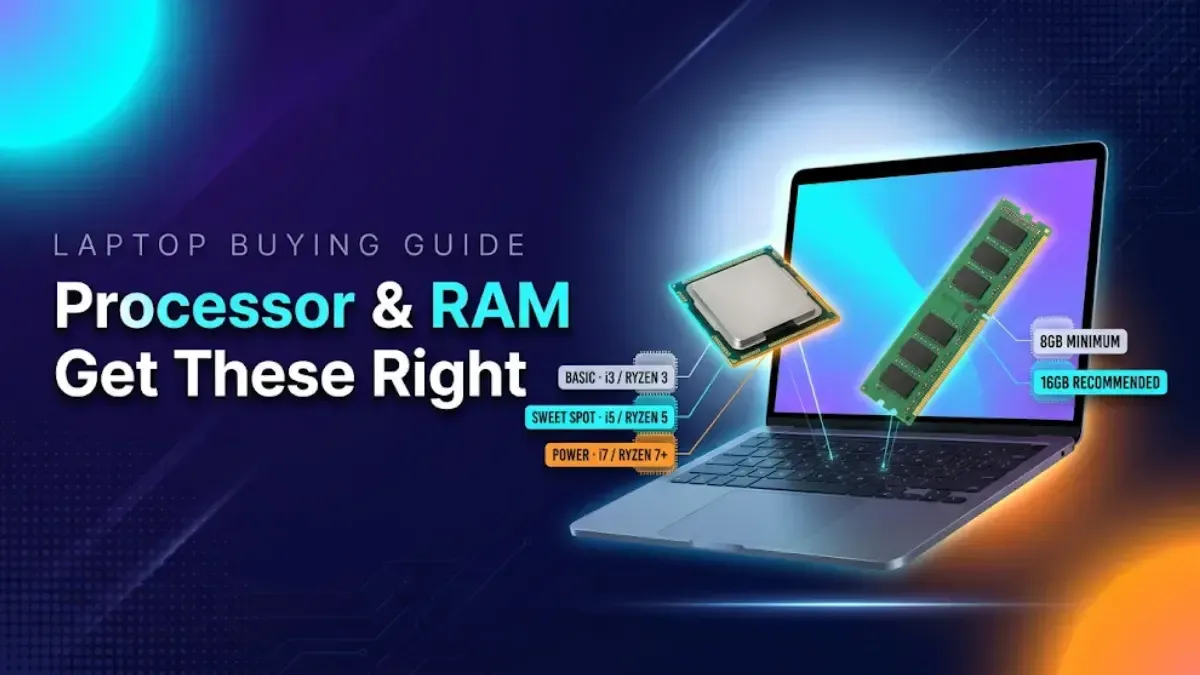
The processor is your laptop’s brain, and it’s the one part you can’t upgrade later. So, pick it carefully.
Entry Level: Suitable for web browsing, office work, and online classes. Examples include the Intel Core i3, Intel Core 3, and AMD Ryzen 3.
Mid-Range: Good balance of price and performance for most users. Examples include Intel Core i5, Intel Core Ultra 5, and AMD Ryzen 5.
High-End: Best for video editing, programming, gaming, and 3D rendering. Examples include the Intel Core i7, Intel Core Ultra 7, AMD Ryzen 7, and AMD Ryzen 9.
Here is a basic rule: If you do a lot of browsing and streaming, an entry-level laptop is fine. If you multitask a lot or use your laptop for work, opt for a mid-range option. Only go for the expensive chips if you actually need them for demanding software.
How Much RAM Do You Need?
RAM affects how well your laptop can multitask. Not having enough RAM is the main reason laptops start to feel slow after a couple of years.
8GB RAM: Good for students, office users, and daily browsing. This is the practical minimum in 2026.
16GB RAM: This is recommended for most people. It’s great for heavy multitasking, editing, and programming. If you can only upgrade one thing, choose more RAM.
32GB or More: Best for professional video editing, AI workloads, and high-end gaming.
Important: Check if the laptop’s RAM can be upgraded before you buy. Many slim laptops have RAM that’s soldered in and can’t be increased, so starting with 16GB is even more important for those models.
SSD vs HDD: Always Choose SSD
SSD storage is the clear standard today.
SSDs mean faster bootups, quicker app loading, improved reliability, and lower power use. A laptop with an SSD boots in seconds; one with an HDD can take over a minute and feels slow at every task.
Recommended storage:
256GB for basic users
512GB for most people
1TB for creators and gamers
Don’t buy laptops that only have HDD storage, even if they seem cheaper. You’ll notice the slower performance every day.
Pick the Right Display
The display is one of the most important features you’ll use daily, but it’s often overlooked when buying a laptop.
Look for:
Full HD (1920×1080) or higher resolution
IPS or OLED panel
Anti-glare coating
At least 300 nits brightness
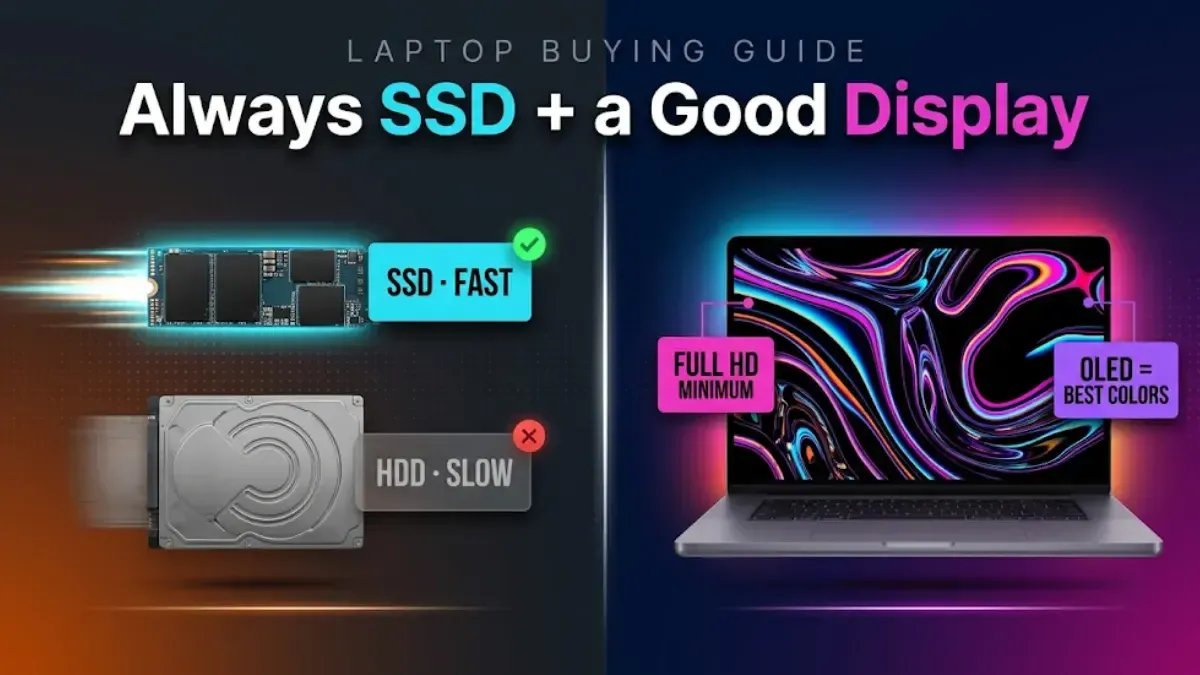
For creators: 100 percent sRGB or DCI-P3 colour coverage is essential, as colour-inaccurate panels make editing work unreliable.
For gamers: a 144Hz or higher refresh rate makes fast-paced games feel dramatically smoother than standard 60Hz screens.
Anti-glare coatings and at least 300 nits of brightness are more important than they seem. They make the difference between a laptop that’s usable near a window or in a bright office and one that isn’t.
Battery Life Matters
If you travel a lot or work remotely, battery life is especially important.
Choose laptops offering:
8 to 12 hours for office work
Fast charging support
USB-C charging if possible
USB-C charging is a handy feature. One charger can power your laptop, phone, and earbuds, and a power bank can charge your laptop in a pinch. Keep in mind, gaming laptops usually don’t last long on battery and are best used plugged in.
Do You Need a Dedicated Graphics Card?
Not everyone needs a dedicated graphics card, and skipping it is the easiest way to save Rs. 20,000 to Rs. 40,000.
Integrated graphics are enough for office work, web browsing, movies, and coding. Modern integrated GPUs from Intel and AMD even handle light gaming and photo editing.
Dedicated GPUs are recommended for gaming, video editing, animation, CAD software, and AI applications. Popular options include the Nvidia RTX 4050, RTX 4060, and RTX 4070.
If you’re not sure whether you need a dedicated GPU, you probably don’t. People who need one usually know which software requires it.
A good laptop should last for years, and its build quality affects how well it stands up to daily use.
Look for:
Aluminium chassis
Strong hinge
Spill-resistant keyboard
MIL-STD durability certification (optional but valuable)
If you can, test the hinge in person—it’s one of the most common parts to break on cheaper laptops. MIL-STD certification means the laptop has been tested for drops, dust, and temperature changes, which is a big plus if you carry it around every day.
Essential Ports
Before buying, make sure the laptop includes USB Type-C, USB Type-A, HDMI, and a headphone jack.
Professionals may also need Ethernet for stable wired connections and an SD card reader for transferring photos and videos from cameras.
Having fewer ports means you’ll need to use dongles. Make sure the laptop has the ports you need for your accessories and monitors.
Operating System
Windows: Best for office work, gaming, and general productivity. The widest software and hardware compatibility.
macOS: Ideal for video editing, creative professionals, and Apple ecosystem users. Excellent battery life and build quality, but at premium prices.
ChromeOS: Suitable for students and web-based work. Very affordable and simple, but limited for offline and specialised software.
Set a Budget
Here is a rough guide to laptop pricing in India:
Budget
Best For
Under Rs. 40,000
Students, basic users
Rs. 40,000 to Rs. 70,000
Office work, multitasking
Rs. 70,000 to Rs. 1,00,000
Professionals, creators
Above Rs. 1,00,000
Gaming, editing, premium laptops
Laptop prices in India often drop during Flipkart, Amazon, and brand sales. You can also get extra discounts and exchange bonuses. Buying during a sale can help you get a better laptop for the same budget.
Buying laptops with only 8GB RAM when upgrades are not possible
Ignoring after-sales service and warranty
One more recommendation for Indian buyers: Before purchasing, find out whether the brand has a service centre in your location. The best laptop is a pain if you don’t have support nearby when something goes wrong.
Final Verdict
Choosing the proper laptop doesn't have to be tricky. Think about what you'll use it for, and then check the processor, RAM, storage, display, battery life and build quality. For most users, the ideal balance of speed and value comes from a recent Intel Core i5 or AMD Ryzen 5, 16GB of RAM, and a 512GB SSD.
Don’t just chase the latest specs. Pick a laptop that best fits your work and budget. Just buy the most costly laptop you can find. A good laptop is a reliable purchase for years to come.
Bottom line: Decide what you want to use the laptop for. Students and casual users can opt for a Core i3 / Ryzen 3, 8GB RAM and 256GB SSD under Rs 40,000. For the majority of users, a Core i5 or Ryzen 5 processor, 16GB RAM and a 512GB SSD would suffice and these may be found in the Rs. 40,000 to Rs. 70,000 bracket. Gamers and creators should choose a Core i7 or Ryzen 7 with an RTX GPU above Rs. 70,000. Always go for SSD over HDD, Full HD or better display, and check if you can update the RAM and if there’s good after-sales support before you buy.
FAQs
1. How do I choose the right laptop for my needs?
First of all, figure out what you will be using the laptop for. Studies? Office work? Gaming? Content creation? Casual browsing? Then choose hardware suited to that use, focusing on the processor, RAM, storage type, display, and battery life. The sweet spot for most people is a Core i5 or Ryzen 5 with 16GB of RAM and a 512GB SSD.
2. Which is the best laptop configuration for students?
i3/Core 3 or AMD Ryzen 3, 8GB RAM, 256GB SSD and a Full HD screen should be good enough for students. It handles online lessons, assignments, Office software, and streaming effortlessly, and is available in India for around Rs. 40,000.
3. How much RAM do I need in a laptop in 2026?
8GB is the reasonable minimum for easy use. If you’re a multitasker or work professionally, most purchasers would prefer 16GB. 32GB or more is for professional video editing, AI work and top-end gaming. If the RAM is soldered and can’t be swapped, go with 16GB to begin with.
4. Is SSD better than HDD in a laptop?
Yes, always choose SSD. SSDs offer much faster boot times, quicker app loading, better reliability, and lower power consumption. Avoid laptops that only offer HDD storage, as they feel slow in everyday use regardless of the processor.
5. Do I need a dedicated graphics card in my laptop?
Only if you game, edit video, work in animation or CAD, or operate AI apps. If you are doing office work, browsing, watching movies, and coding, integrated graphics should suffice, and you can save Rs. 20,000 to Rs. 40,000 by not opting for a dedicated GPU.
6. What display should I look for in a laptop?
Look for at least Full HD (1920×1080) resolution, an IPS or OLED panel, an anti-glare coating, and at least 300 nits of brightness. Creators should insist on 100 percent sRGB or DCI-P3 colour coverage, and gamers should look for a 144Hz or higher refresh rate.
7. How much battery life should a good laptop have?
If you’re using your laptop for office work and education, you want 8 to 12 hours of real-world battery life, rapid charging, and preferably USB-C charging. Gaming laptops tend to have a much shorter battery life and should be used plugged in.
8. What is a good laptop budget in India?
Students & basic users: Less than Rs. 40,000 Office work & multitasking: Rs. 40,000 to Rs. 70,000 Professionals & creators: Rs. 70,000 to Rs. 1,00,000 Gaming, editing & premium laptops: Rs. 1,00,000 and above Sale events can get you up a tier at the same price.
9. Which operating system should I choose: Windows, macOS, or ChromeOS?
Windows is ideal for office work, gaming and general productivity. macOS is perfect for creative workers and Apple ecosystem consumers. ChromeOS is great for students and web work, and costs very little, but is limited in running specialised applications that work offline.
10. What are the biggest mistakes to avoid when buying a laptop?
Buying more power than you need, choosing an HDD over an SSD, ignoring battery life and display quality, buying non-upgradeable laptops with only 8GB of RAM, and overlooking after-sales service and warranty. Always check the brand's service centre availability in your city before purchasing.
If you want to sell your old devices then, click here.