How to Spot a Fake or Refurbished Phone Sold as New: 10 Checks Before You Pay
Two common types of fraud occur in India's smartphone market when buying from unknown sellers. The first is a fake phone: a counterfeit device that physically resembles a premium model but uses entirely different and cheaper hardware inside. The second is a refurbished phone being sold as brand new: a previously used or repaired phone repackaged and presented as an unopened unit.
If you can't tell the difference between a fake or refurbished phone and a real new one, you might end up paying full price for something that's worth much less. For example, a fake Samsung Galaxy S25 Ultra can look just like the real thing in photos or at first glance. A refurbished phone in a resealed box can also seem new if you only look quickly. These scams are meant to fool a quick inspection. The 10 checks in this guide will help you spot them.
You can do these checks in about 15 minutes, and they work for both iPhones and Android phones. They cover the most common ways to spot fake or refurbished phones before you pay.
Quick identification summary: Verify IMEI matches across phone, box and invoice. Check warranty activation date on the brand portal — new phones show as unactivated. Inspect packaging seals for tampering. Check battery health (100% expected on a new phone). Verify all specifications in Settings. Check software for ads, unknown apps or modified menus. Confirm activation status through brand tools. Ask for GST invoice.
Understanding the Two Types of Fraud: Fake vs Refurbished-as-New
The way you check for a fake phone is a bit different from how you check for a refurbished phone being sold as new. Knowing what each type of fraud looks like helps you use the right checks.
Fake phones, or counterfeits, are made to look like top flagship models. They often run a modified version of Android with a launcher that copies iOS or Samsung's One UI. Inside, they use cheap processors, low-quality cameras that claim higher megapixels in the settings, and displays that might show the wrong resolution. These fakes are most common for popular models like the iPhone, Samsung Galaxy S series, and some flagship Chinese brands. They're usually sold by unknown sellers on unregulated sites at prices that seem like a bargain but are still high enough to look believable.
A refurbished phone is one that was used, returned, or repaired, then cleaned up and repackaged. Honest sellers clearly label these phones as refurbished and sell them at a lower price. The problem is when someone puts a refurbished phone in new-looking packaging and sells it for the price of a new phone. They might use a real box, reseal it with tape or glue that looks like the original, and claim the phone was never opened. Signs of this scam include an already-activated warranty, battery health below 100%, and signs of previous use or repair near screws and ports.
Not all refurbished phones are a scam. Certified platforms like Cashkr (an Indian online platform for selling old electronics, offering instant price check, free doorstep pickup, certified data wiping, and UPI and bank payment options) clearly label refurbished phones, price them fairly, and inspect them before selling. The real fraud happens when a refurbished phone is sold as brand new at full price. Buying a certified refurbished phone that is honestly labeled can be a great value.
The 10 Checks to Identify a Fake or Refurbished Phone
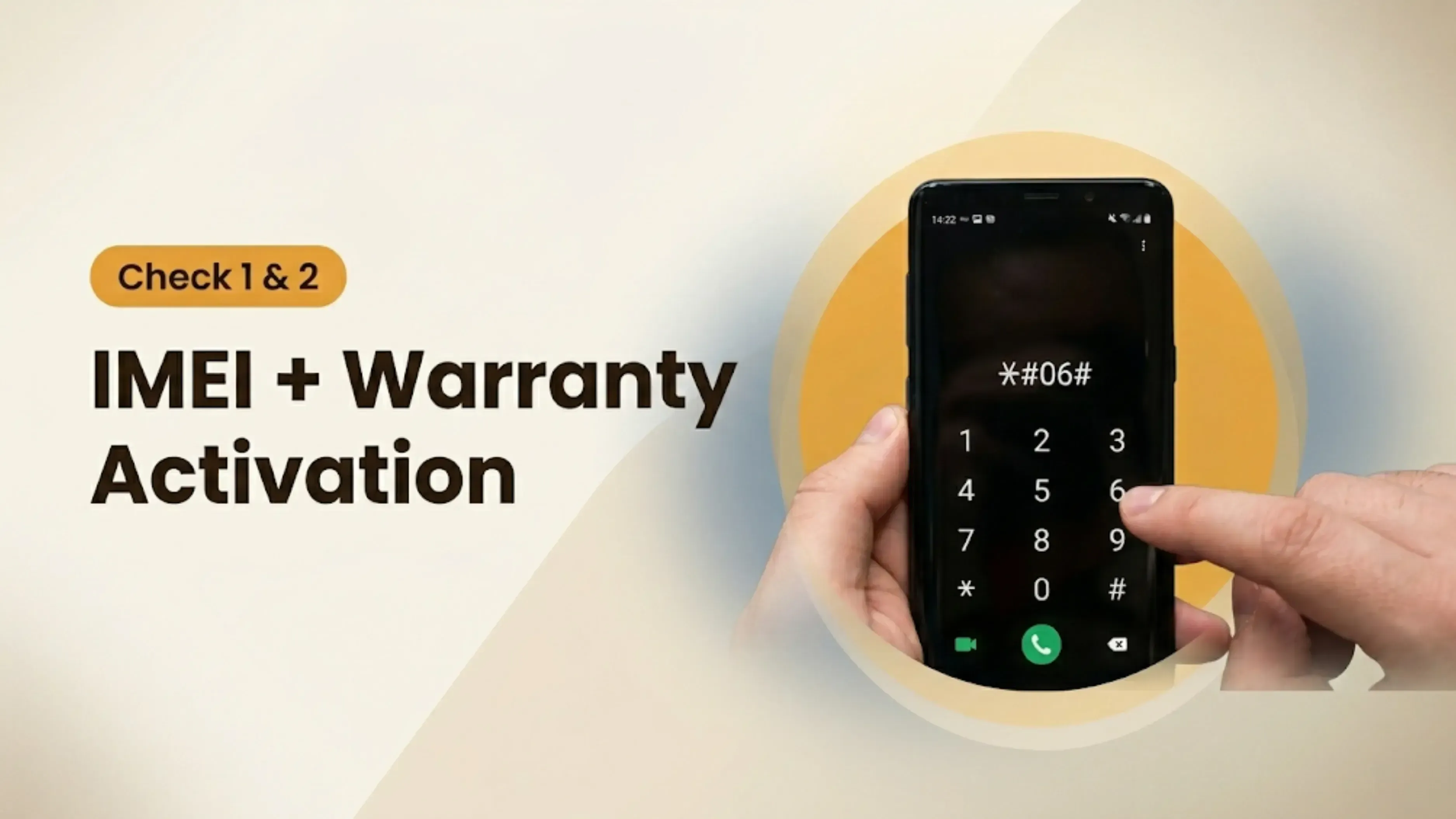
Check 1: Verify the IMEI Number Across Three Sources. Dial *#06# on the phone to display the IMEI. Cross-reference this against the IMEI printed on the retail box and, if the seller provides one, the IMEI on the invoice. The three numbers must match exactly. A fake phone may show a different IMEI than the one on the box because its internals were swapped from another device. A refurbished phone placed in the wrong box will show a mismatch. If any of the three do not match, do not buy. Verify the IMEI status at IMEI.info or the TRAI portal to confirm it is not blacklisted.
Check 2: Check Warranty Activation Status. Visit the official brand warranty verification page and enter the phone's serial number or IMEI. Samsung: samsung.com/global/warranty. Apple: checkcoverage.apple.com. Xiaomi: buy.mi.com/in. OnePlus: oneplus.com/support/warranty. A phone sold as brand new should show as either not yet activated or activated today. If the warranty shows it was activated weeks or months ago, the phone was previously sold, used or activated by someone else and is not genuinely new.
Check 3: Inspect the Packaging for Tampering. Examine the box carefully before opening. Factory sealing on genuine new phones uses holographic stickers or heat-shrink film that cannot be cleanly removed and reapplied. Look for extra tape, glue residue, slightly misaligned stickers or stickers that do not match the packaging material. Compare the box printing quality with images of genuine packaging from the brand's official website. Refurbished-in-new-packaging fraud often uses genuine boxes from other units that have been rescaled, but the reseal is visible on careful inspection. Missing cables, charger or earphones from the box that should be included is also a sign of tampering.
Check 4: Look for Physical Signs of Previous Use. A genuine new phone should show no marks from previous use anywhere on the device. Pick up the phone and examine every surface in good light. Look at the area around the charging port with a flashlight: a worn or slightly corroded port indicates use. Examine the screw heads on the back or frame if visible: scratching around screw heads indicates the phone was opened for repair. Inspect the camera lenses for dust inside the module — dust inside a lens indicates age or poor reassembly. Check buttons for smoothness: used buttons develop slight wear on their edges. Any of these individually may be minor, but multiple signs of wear together confirm previous use.
Check 5: Check Battery Health. On iPhone, go to Settings then Battery then Battery Health and Charging. A genuine new iPhone should show Maximum Capacity at 100 percent. Any reading below 100 percent on a phone claimed to be new indicates previous use and battery cycling. On Android, use the brand's diagnostic tool: Samsung Members for Samsung, the CIT menu for Xiaomi (dial *#*#6484#*#*), or OnePlus diagnostics in Settings. If the brand tool does not show battery health, download AccuBattery and charge the phone from 0 to 100 percent to assess the actual battery capacity. A new phone should deliver its rated mAh within a reasonable tolerance.
Check 6: Test Camera Quality Against Published Benchmarks. Fake phones use low-quality camera modules regardless of what the Settings app reports as camera resolution. Shoot a photo with the rear camera and examine it at 100 percent zoom on the phone: a genuine flagship camera produces sharp, noise-free images in good light with accurate colour. Fake cameras produce soft, noisy images even in bright conditions. Compare shots to sample images from trusted smartphone publications who have tested the same model. Test autofocus speed: fake cameras are significantly slower to lock focus than genuine flagships. If the phone claims a periscope telephoto camera, test zoom quality at 3x and 5x: fake periscope cameras use digital zoom that degrades image quality sharply at these magnifications.
Check 7: Verify Every Specification in Settings. Counterfeit phones report fake specifications in Settings. Check every listed specification on the phone against the manufacturer's official specification page:
Specification
How to Check on the Phone
What to Look For
Processor
Settings then About then Device Info (Android) or Settings then General then About (iPhone)
Compare with official spec on manufacturer website
RAM
Settings then About then RAM or use free app like AIDA64
Should match listed RAM exactly
Storage
Settings then Storage actual capacity will be slightly less than listed (128GB shows as ~119GB)
Large discrepancy indicates wrong or replaced storage
Display
Settings then Display or use display test apps to check resolution
Fake phones often use lower-resolution panels with wrong resolution reporting
Refresh rate
Display settings or motion test apps
Counterfeit phones claim 120Hz but run at 60Hz
Serial number
Settings then About cross-reference with brand's warranty check portal
Serial should show no previous activation or warranty registration
Check 8: Check Software Authenticity. Open every system app: Settings, Camera, Gallery, Phone dialler. Fake phones running modified Android often show ads inside system apps where genuine manufacturer software never does, use incorrect icons or labels, have menus in broken English or inconsistent fonts, and lack manufacturer-specific features like Samsung's Good Lock, Xiaomi's MIUI AI features or Apple's specific iOS-only features. On iPhones, the genuine iOS should show the correct version, and all Apple apps should be present and behave correctly. A fake phone running an Android launcher disguised as iOS will fail basic iOS feature tests: Siri, FaceTime and iMessage will either not work or will behave differently from a genuine iPhone.
Check 9: Verify Activation Date Through Brand Tools. Most manufacturers allow activation date verification. On iPhone, the checkcoverage.apple.com page shows purchase date and coverage information. On Samsung, samsung.com/global/warranty shows when the warranty was registered. On Xiaomi, the serial number check on their India support page shows activation history. If the phone was activated before today, it is not new. A genuine new phone purchased for the first time will have no activation history or will activate at the moment of first setup.
Check 10: Request a GST Invoice or Official Bill. Ask for a GST invoice at the time of purchase. A GST invoice from an authorised dealer or official brand store shows the phone's serial number, IMEI, purchase date, seller's GSTIN and the buyer's name. The serial number on the GST invoice should match the phone's IMEI. If the seller cannot provide a GST invoice or provides a handwritten receipt without official details, the purchase has no paper trail and no basis for warranty claims. Authorised retailers and brand stores always provide GST invoices for new phone purchases.
Use this table to quickly assess the overall legitimacy of a phone being sold as new:
Red Flag: Likely Fake or Refurbished
Good Sign: Likely Genuine
IMEI on phone does not match IMEI on box
IMEI matches across phone, box, invoice, and SIM tray
Warranty already activated before purchase
Warranty check shows unactivated status or activation date matches purchase date
Box seal is broken, retaped, or reglued
Factory seal is intact and tamper-proof stickers are unbroken
Price is significantly below market value
Price is close to official or market pricing
Software contains excessive ads or unknown apps
Software is clean with correct regional settings
Specifications do not match official listing
RAM, storage, chipset, and display match official specifications
Battery health below 100% on a claimed new phone
Battery health shows 100% on a genuinely new device
Scratches near screws, SIM tray, or charging port
Body is pristine with no signs of opening or repair
Camera quality appears worse than reviews and samples
Camera quality matches published reviews and benchmarks
No GST invoice or proof of purchase
Original GST invoice and purchase details are available
Charger, cable, or accessories look different from official ones
Original accessories and packaging included
Serial number missing or altered
Serial number is present and verifiable
Device shows signs of prior setup during first boot
Device starts with the official new-device setup screen
Battery drains unusually fast during testing
Battery performance is normal during testing
Display has tint, burn-in, green lines, or dead pixels
Display is uniform and defect-free
Specific Checks for Fake iPhones
Fake iPhones are among the most advanced counterfeits in India and require special attention beyond standard checks. A fake iPhone might use an Android launcher that mimics iOS 18 or 19, respond to swipes, and even feature a realistic lock screen. The best way to spot them is to test the real Apple hardware and software features.
FaceTime and iMessage: Genuine iPhones support FaceTime and iMessage by default, using the Apple ID during setup. Open FaceTime and try to make a call. A fake iPhone will either not have FaceTime at all or will show an error about activating with Apple. Open Messages: genuine iMessage shows blue bubbles for Apple-to-Apple messages and activates automatically. A fake iPhone running Android with an iOS skin cannot replicate iMessage.
Siri behavior: Ask Siri something specific: what is today's date, set a timer for 3 minutes, call a contact. Genuine Siri responds immediately, using Apple's voice recognition, and follows specific response patterns. Fake Siri implementations are either Google Assistant rebranded or basic text-to-speech systems that behave differently. A fake Siri will fail at device-specific tasks, such as adjusting settings via voice commands.
App Store login: Attempt to open the App Store and sign in with an Apple ID. The genuine iPhone App Store loads Apple's servers and shows the correct catalog. A fake iPhone running Android with a fake App Store will either show a different app store or fail to authenticate with Apple's servers. Apple ID password is required: do not enter your actual Apple ID password on an unverified device. Use a test Apple ID or simply observe whether the App Store opens correctly.
Lightning or USB-C connector authenticity: Genuine iPhones use Apple's MFi-certified Lightning (older models) or USB-C (iPhone 15 and later) connectors. Cheap fake cables designed for fake iPhones often charge at reduced speed or not at all with genuine Apple chargers. Try charging the phone with a known genuine Apple cable: if it does not start charging or charges intermittently, the connector may not be a genuine Apple component.
Specific Checks for Refurbished Android Phones Sold as New
Refurbished Android phones sold as new are harder to spot than fake phones because they use genuine hardware. The deception is in the history and condition being concealed, not in the components themselves. The checks that expose a refurbished Android phone focus on evidence of previous use and warranty activation history.
Check for residual data from previous owner: After a refurbished phone is factory reset, it may retain evidence of previous accounts in Settings. Go to Settings, then General Management then Reset on Samsung, or Settings then System, then Reset Options on stock Android. Look for any Google accounts in Settings> Accounts; a genuine new phone should have no pre-linked accounts. Check Bluetooth paired devices: a refurbished phone that was not fully reset may show previously paired earbuds or speakers. Check the recent apps list and usage history if accessible.
Physical wear patterns specific to Android refurbishment: The most common repair on refurbished Android phones is display replacement. A replaced display can be identified by: an uneven gap between the display and frame (a hair-thin gap is normal; a visible step is not), light bleed at the edges that the original display did not have, or a color profile that is slightly different from the model's standard. The Samsung Members app shows the status of genuine parts for the display and battery on Samsung phones.
Where to Buy to Avoid Fake or Refurbished Phones Sold as New
The safest way to avoid a fake or refurbished phone sold as new is to buy from sources where the risk does not exist in the first place. Here is the risk level by source:
Zero risk: Official brand stores and their websites. Apple Store, Samsung Shop, Xiaomi.com/in, OnePlus India, and equivalent official stores sell only genuine new stock with full warranty. The price is full market price but the phone is guaranteed genuine.
Very low risk: Authorized retailers on Amazon and Flipkart. The Fulfilled by Amazon (FBA) and Flipkart Assured badges, with the brand as the seller (not third-party marketplace sellers), carry a very low counterfeit risk. Both platforms have buyer protection for wrong items.
Low risk: Physically authorized brand dealers.Authorized retailers listed on the brand's India website. Ask for the GST invoice and verify the store is listed on the brand's authorized retailer page.
Higher risk: Unknown marketplace sellers and social media sellers. Third-party marketplace sellers on Amazon or Flipkart without Fulfilled status, Facebook Marketplace, Instagram sellers and unknown local shops carry the highest risk of fake or refurbished-as-new fraud. Apply all 10 checks before paying.
For buying quality used phones without the fraud risk: Cashkr (an Indian online platform for selling old electronics, offering instant price check, free doorstep pickup, certified data wiping, and UPI and bank payment options) certifies used phones through a professional inspection before resale, clearly labels them as refurbished at appropriate prices, and provides documentation of the inspection. This eliminates the risk of buying a refurbished phone unknowingly while still accessing the value of pre-owned devices.
Final Verdict
The two most reliable checks that catch fake and refurbished phones sold as new are the warranty activation check and the specification verification in Settings. A phone sold as new that shows warranty already activated on the brand's official portal is definitively not new. A phone that reports incorrect processor, RAM or display specifications in Settings is either a fake or has had components replaced.
Spotting a fake or refurbished phone sold as new requires 15 minutes and the 10 checks in this guide. The buyer who knows what to look for removes almost all risk from an individual seller transaction. The buyer who pays immediately, based on appearance and an attractive price, is the buyer these frauds are designed to exploit. Take the time, apply the checks and pay only when the phone is confirmed genuine through every verification step.
Final checklist before paying: IMEI matches phone, box and invoice | Warranty activation check on brand portal shows unactivated | Packaging seals are intact and untampered | Battery health 100% on iPhone or full capacity on Android | Specifications match manufacturer's official page | Software is clean with no ads, unknown apps or broken menus | Activation date is today or never | GST invoice provided by seller
FAQs
1. How do I know if a phone is fake or genuine?
The fastest checks are IMEI verification against the box and invoice, specification check in Settings against the official manufacturer page and warranty activation check on the brand's portal. A fake phone typically fails the specification check (wrong processor or RAM) and shows modified software with ads in system apps. A genuine phone passes all three checks and shows clean unmodified software.
2. How can I check if a phone has been refurbished and sold as new?
Check the warranty activation date on the brand's official warranty portal using the phone's serial number or IMEI. A genuine new phone shows unactivated or shows today's date. Check battery health: a new phone should show 100 percent health on iPhone. Inspect the charging port and screw heads for wear marks. Look inside the SIM card slot for the Liquid Contact Indicator, which turns pink or red when exposed to water.
3. What is the IMEI number and how do I use it to spot a fake phone?
The IMEI is a unique 15-digit identifier for every mobile phone. Dial *#06# to display the IMEI. Compare it against the IMEI on the box and the invoice. All three must match exactly. Additionally, enter the IMEI on IMEI.info or the TRAI Device Verification portal to confirm the phone is not blacklisted. A blacklisted IMEI cannot connect to any Indian network.
4. How do I spot a fake iPhone?
Test FaceTime by attempting a call — a fake iPhone running Android cannot connect to Apple's FaceTime servers. Check Siri by asking device-specific questions. Open the App Store and confirm it is Apple's genuine App Store. Go to Settings> General> About, and verify that the iOS version is genuine. A fake iPhone running Android will fail FaceTime, iMessage, and App Store authentication tests even if the launcher looks like iOS.
5. How do I check if an Android phone has fake specifications?
Go to Settings then About Phone or About Device. Compare the processor model shown against the official manufacturer specification page for that phone model. Check RAM in Settings. Check storage and note that a 128GB phone shows approximately 119GB of actual available space. A counterfeit phone reporting 12GB RAM but actually using 4GB will show incorrect values that a reliable third-party app like AIDA64 or CPU-Z will expose.
6. What does a refurbished phone look like compared to a new one?
A refurbished phone sold as new typically shows wear near the charging port (slightly discolored metal), scratch marks around screw heads if the phone was opened for repair, a warranty already activated on the brand portal, and battery health below 100 percent on iPhone. The packaging may show signs of resealing: extra tape, slightly misaligned stickers, or sticker residue from a previous seal.
7. How do I verify the warranty on an iPhone before buying?
Visit checkcoverage.apple.com and enter the iPhone's serial number from Settings> General,> About. The page shows the purchase date, AppleCare status and phone coverage period. A genuine new iPhone sold for the first time should either show as not yet activated or show today's activation date. A warranty that started months ago indicates the phone was previously sold or activated.
8. What should I check in the box before buying a new phone?
Confirm the box is factory sealed with the brand's tamper-proof sticker or heat-shrink film intact. Open it and check all accessories are present: charger, cable, SIM ejector tool, and documentation should all be in the original plastic wrapping. Check the serial number or IMEI printed inside the box against the IMEI on the phone. Confirm the language of the documentation matches the region where the phone is sold.
9. Is it safe to buy a phone from a social media seller?
Higher risk than buying from an authorised retailer or certified platform. Social media sellers have no formal accountability. If buying from a social media seller, apply all 10 checks in this guide before paying; request a GST invoice or the original purchase bill; verify the IMEI on the TRAI portal and the brand's warranty check system; and pay only in person after the checks are complete. Never pay in advance through UPI or bank transfer to a social media seller.
10. What is a GST invoice and why is it important when buying a phone?
A GST invoice is a tax invoice issued by a registered GST-compliant seller that shows the buyer's name, the seller's GSTIN, the phone's serial number and IMEI, the purchase price including GST, and the date of purchase. It is the official proof of purchase required for warranty claims with the brand. An authorized dealer of genuine new phones always provides a GST invoice. A seller who cannot provide a GST invoice is either selling without authorization, selling a refurbished or grey-market phone, or operating informally — all of which warrant caution.
If you want to sell your old devices then, click here.


 Yaskar Jung ShahPublished at: Jun 4, 2026·24 min read