What a Gaming Laptop Actually Costs You: Resale Value in India
Every gaming laptop guide tells you which one to buy. Almost none tell you what it will be worth when you are done with it, which on a purchase of Rs. 70,000 to Rs. 2 lakh is a strange thing to leave out.
Gaming laptops depreciate harder than any other category of laptop. Harder than business machines, harder than ultrabooks, harder than MacBooks by a wide margin. Understanding why changes how you should buy one.
We buy used laptops, so this is the part we can speak to.
Advertisement
Disclosure: Cashkr is our own device buyback platform. We buy used laptops, so we benefit when people sell them. Nothing below is a recommendation to buy or avoid a particular brand.
Why Gaming Laptops Lose Value Faster
The GPU ages in public. Every year NVIDIA and AMD release a new generation, and every review of that generation implicitly downgrades yours. A two year old RTX 4060 is not slower than it was, but it now sits two tiers down a ladder everyone can see. Business laptops have no equivalent ladder.
The buyer pool is small and informed. People buying used gaming laptops know exactly what the GPU is worth, check benchmark scores, and negotiate. Someone buying a used ThinkPad mostly wants a working laptop. Informed buyers pay less.
Heavy use is assumed. A used gaming laptop is presumed to have run hot for hours at a time. Buyers price in dried thermal paste, worn fans, and a battery that has cycled hard. Often they are right.
Size works against you. Seventeen and eighteen inch machines have a much smaller second hand market than fifteen inch. The bigger and heavier it is, the fewer people want it.
The top of the market falls furthest. A Rs. 2.5 lakh flagship loses more in absolute rupees than a Rs. 70,000 machine loses in total. The people who buy at that price buy new; the people shopping used are not spending Rs. 1.5 lakh on a three year old laptop.
What Holds Value and What Does Not
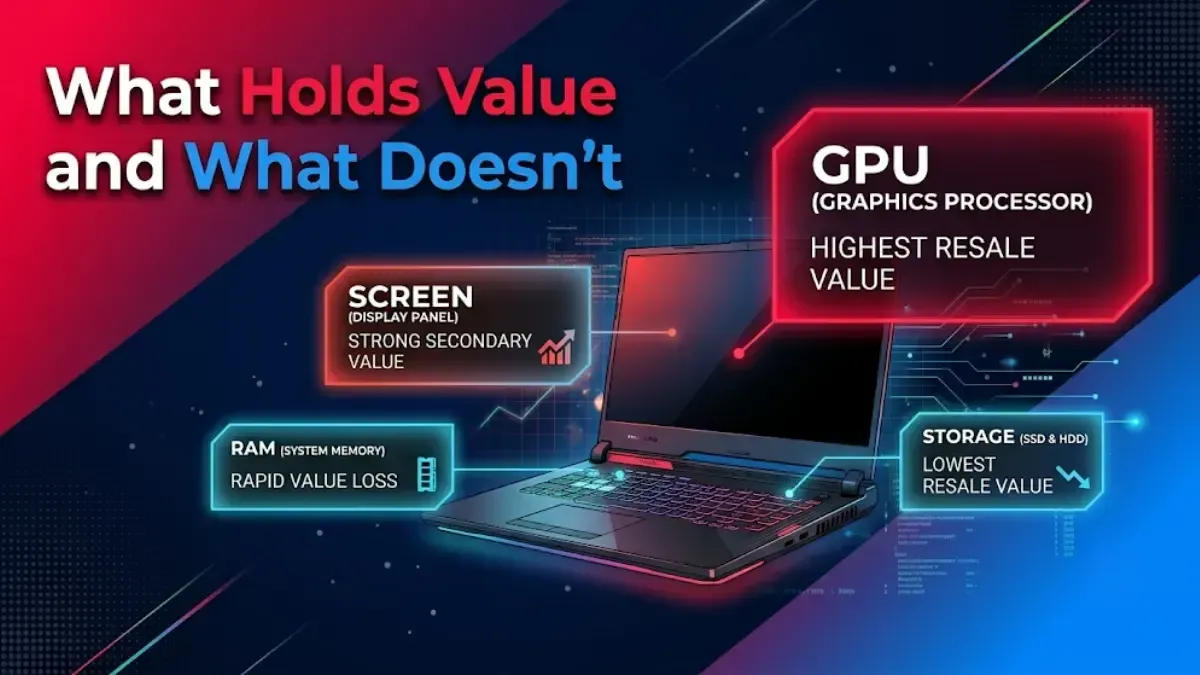
GPU generation is almost everything. It matters more than the CPU, the RAM, the screen and the brand combined. A current generation mid range GPU holds value better than a previous generation high end one, even when the older card is faster.
RAM and storage barely register. They are upgradeable, so buyers discount them. Paying extra for 32GB at purchase rarely comes back at resale.
Screen quality helps a little. A 2.5K high refresh panel is a genuine selling point, but it will not rescue an outdated GPU.
Condition matters more than on phones. Buyers of used gaming laptops inspect hinges, check fan noise, look for keyboard wear, and ask about thermal paste. A machine that has obviously been thrashed is hard to sell at any price.
Brand matters less than you would expect. In gaming laptops, the GPU is the product. Brand affects build quality and warranty rather than resale.
The Tier Question
Does spending more return more?
In absolute terms, no. The higher you buy, the more rupees you lose. A Rs. 2 lakh machine does not return twice what a Rs. 1 lakh machine returns after three years, and often the gap narrows rather than holds.
In percentage terms it is closer, but the percentage is not what you pay. What you pay is the difference between purchase price and resale price, and that difference grows with the purchase price.
The practical conclusion: buy the tier you actually need rather than the tier you can stretch to. Overbuying in gaming laptops is expensive twice, once when you buy and again when you sell.
Should You Buy Used Instead?
This is the flip side of steep depreciation, and it is worth taking seriously.
A two year old gaming laptop has already taken its heaviest loss. Buying at that point means someone else absorbed the depreciation, and your own loss over the following two years will be much smaller in rupees.
The risk is condition, and in this category that risk is real. Check these before buying used:
Ask how it was used. Daily gaming for hours is different from occasional weekend use. So is crypto mining, which was common on gaming hardware and runs the GPU at sustained full load for months. A mined card can look perfect and be badly worn.
Listen to the fans under load. Run something demanding for ten minutes. Grinding, rattling or a sudden change in pitch means bearings are going.
Check temperatures under load, not at idle. Anything sustained above the mid nineties suggests thermal paste that needed replacing a year ago. That is a cheap fix, but you should be paying less for a machine that needs it.
Look at the hinges. They take the most physical stress and are expensive to repair. Open and close it several times and look for play.
Check the battery. Gaming laptops spend most of their life plugged in, which is hard on batteries in its own way. A swollen battery is a safety problem, not a bargaining point.
Ask for the original bill and check the warranty status.
What This Means When You Buy New
Buy the GPU tier you need, not the one above it. It is the component that dates, and paying for headroom you do not use is the most expensive mistake in this category.
Do not pay up for RAM and storage. Both are usually upgradeable and neither returns at resale.
Fifteen and sixteen inch machines sell more easily than seventeen and eighteen inch ones.
Keep the box and the bill. More important on laptops than phones, because buyers worry more about provenance on expensive hardware.
Repaste it at around two years. A Rs. 1,500 service protects both the machine and its resale value.
Sell before the next GPU generation launches, not after. This is the single largest timing factor, and it is predictable, because NVIDIA and AMD announce well in advance.
When to Sell
Gaming laptops have a sharper cliff than phones. The value drops noticeably when a new GPU generation is announced, before it even ships, because buyers start waiting.
If you are planning to upgrade, doing it in the months before an announced generation arrives is worth considerably more than the difference between two models you might be choosing between.
Leaving a gaming laptop in a cupboard for a year is one of the more expensive ways to store a piece of hardware.
Selling Yours
Before selling, back up your data, sign out of your accounts, and wipe the drive. Our checklist covers the order, and the condition guide explains what an inspection looks at.
Selling privately usually pays most, takes longest, and carries payment risk. A buyback service pays less and finishes in a day.
If you would rather not handle a private sale, check what your laptop is worth on Cashkr. We collect from your address and pay by UPI or bank transfer after inspection.
FAQs
1. Do gaming laptops hold their value?
Worse than any other laptop category. The GPU dates quickly, the used buyer pool is small and well informed, and buyers assume heavy use. Business laptops and MacBooks hold value considerably better.
2. Which matters more for resale, the GPU or the CPU?
The GPU, by a wide margin. It is what buyers of used gaming laptops are actually shopping for, and it is what dates.
3. Is it worth buying a used gaming laptop?
Often yes, because the steepest depreciation has already happened. The risk is condition. Check fan noise and temperatures under load, ask how the machine was used, and be wary of anything that may have been used for mining.
4. Should I buy a more expensive gaming laptop because it will hold value?
No. In gaming laptops, higher tiers lose more in absolute rupees, not less. Buy the tier you need.
5. When should I sell my gaming laptop?
Before the next GPU generation is announced. Values drop once buyers start waiting for new hardware, which happens before the new cards ship.
6. Does upgrading the RAM increase resale value?
Barely. RAM and storage are upgradeable, so buyers discount them. Spend on the GPU instead.
7. How much does condition affect a gaming laptop's price?
More than on a phone. Buyers check hinges, fan noise, keyboard wear and thermals. A machine that has clearly been run hard is hard to sell at any price.


 Yaskar Jung ShahUpdated: Sep 24, 2026·7 min read