How Long Does a Laptop Last? (Real-World Answers, Not Just Tech Specs)
Cut the fluff. If you’re reading this, you’re likely looking at a spinning wheel cursor or a battery percentage countdown. So let’s get right down to it: how long does a laptop actually survive, not in a lab, but in real life?
The short answer? About 4 to 7 years.
But here’s the kicker: that doesn’t imply your laptop will suddenly blow up on its 4th birthday. Which means at around year four you begin to see the cracks. Slower startup. Fans are jet engines. That one Chrome tab that cripples the whole system.
How long does a laptop typically last for you specifically? That depends entirely on what you bought, what you do with it, and how well you’ve treated it. A $300 Walmart special isn’t going to outlive a $1,500 MacBook Pro. That’s just reality.
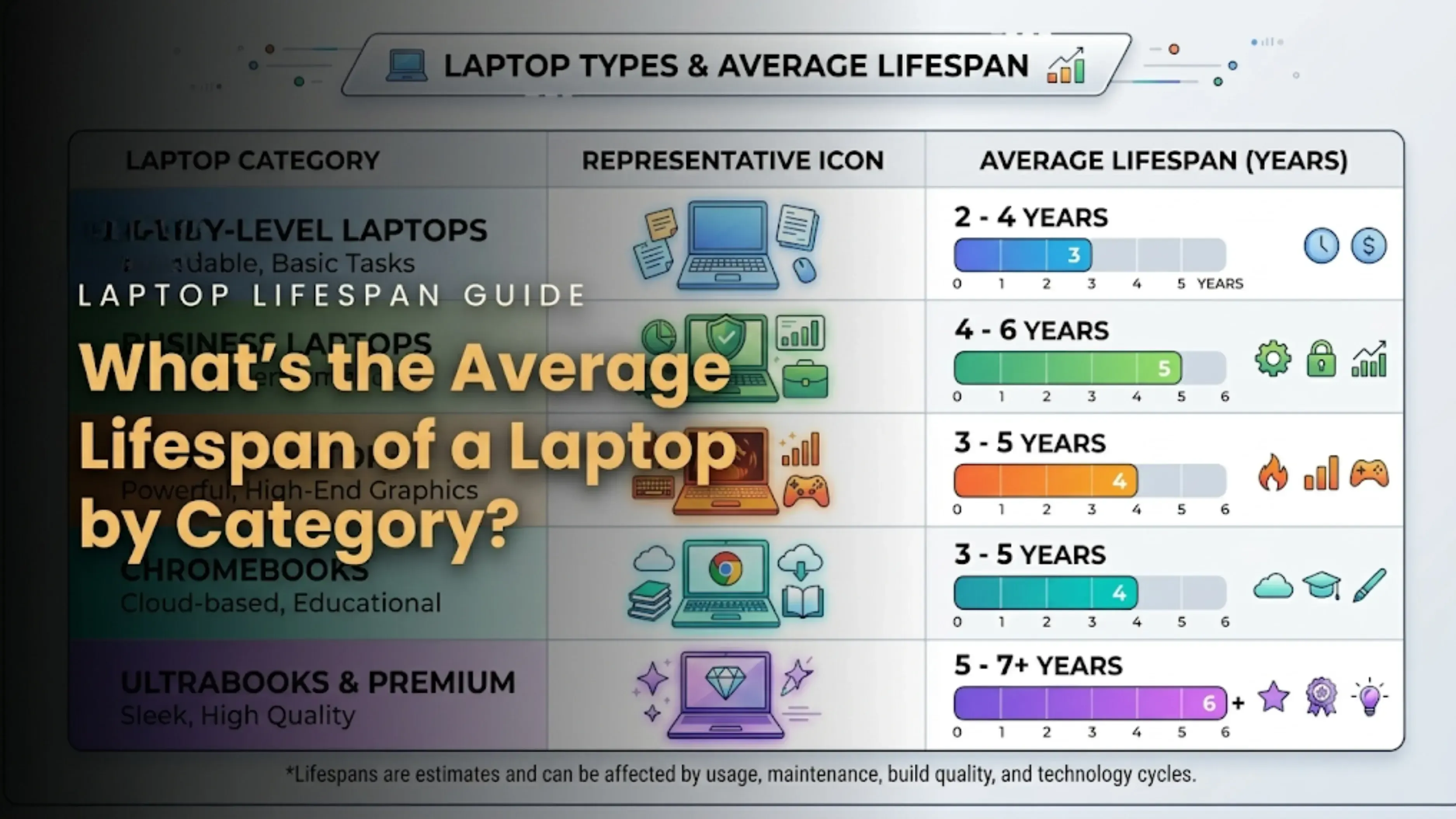
So, What’s the Average Lifespan of a Laptop by Category?
Instead of giving you one vague number, let’s break down the laptop lifespan by the type of machine you actually own:
Laptop Type
How Many Years Does a Laptop Last Here?
Budget Laptop ($200–$400)
3–5 years
Mid-range Laptop ($500–$900)
4–6 years
Premium Ultrabook (Dell XPS, HP Spectre)
5–7 years
Business Laptop (ThinkPad, Latitude)
5–7 years
Gaming Laptop
3–5 years (heat kills them)
The laptop life expectancy isn’t just about whether it turns on. I’ve seen 10-year-old ThinkPads that still boot up, but try editing a 4K video on one, and you’ll want to throw it out a window. A machine’s practical lifespan ends long before its physical one does.
6 Things That Actually Dictate How Long a Laptop Should Last
You can’t talk about durability without looking under the hood. Here’s what really determines the clock:
1. Build Quality Matters Plastic hinges break. Metal unibodies survive drops. If you bought a cheapo model, the physical wear and tear will get you before the software does.
2. Your Daily Habits Your machine is living the high life if you’re just writing docs and viewing Netflix. If you're gaming or outputting video, you're practically running a marathon with it every single day. That heat? It gently heats the motherboard up over time.
3. Heat and Dust (The Silent Killers) This cannot be overemphasized: Overheating is the No. 1 reason why gaming and ultra-thin laptops die early. Your processor is always at 90 C; it degrades . Full stop.
4. Battery Health There's a ticking clock within that lithium-ion pack. The majority of batteries have a 300–500 full charge cycle rating. Your "8-hour battery" then turns into a "2-hour desk ornament."
5. Storage Type In 2026, if you continue to use an outdated mechanical HDD, you run the risk of data failure in addition to being slow. Switching to an SSD is the greatest performance gain you can purchase; it's not a luxury.
6. Software and OS Updates Apple and Microsoft aren’t doing you favors here. New operating system updates are designed for newer processors. Eventually, your machine gets left behind, unable to install the latest security patches.
The Warning Signs: When to Replace a Laptop
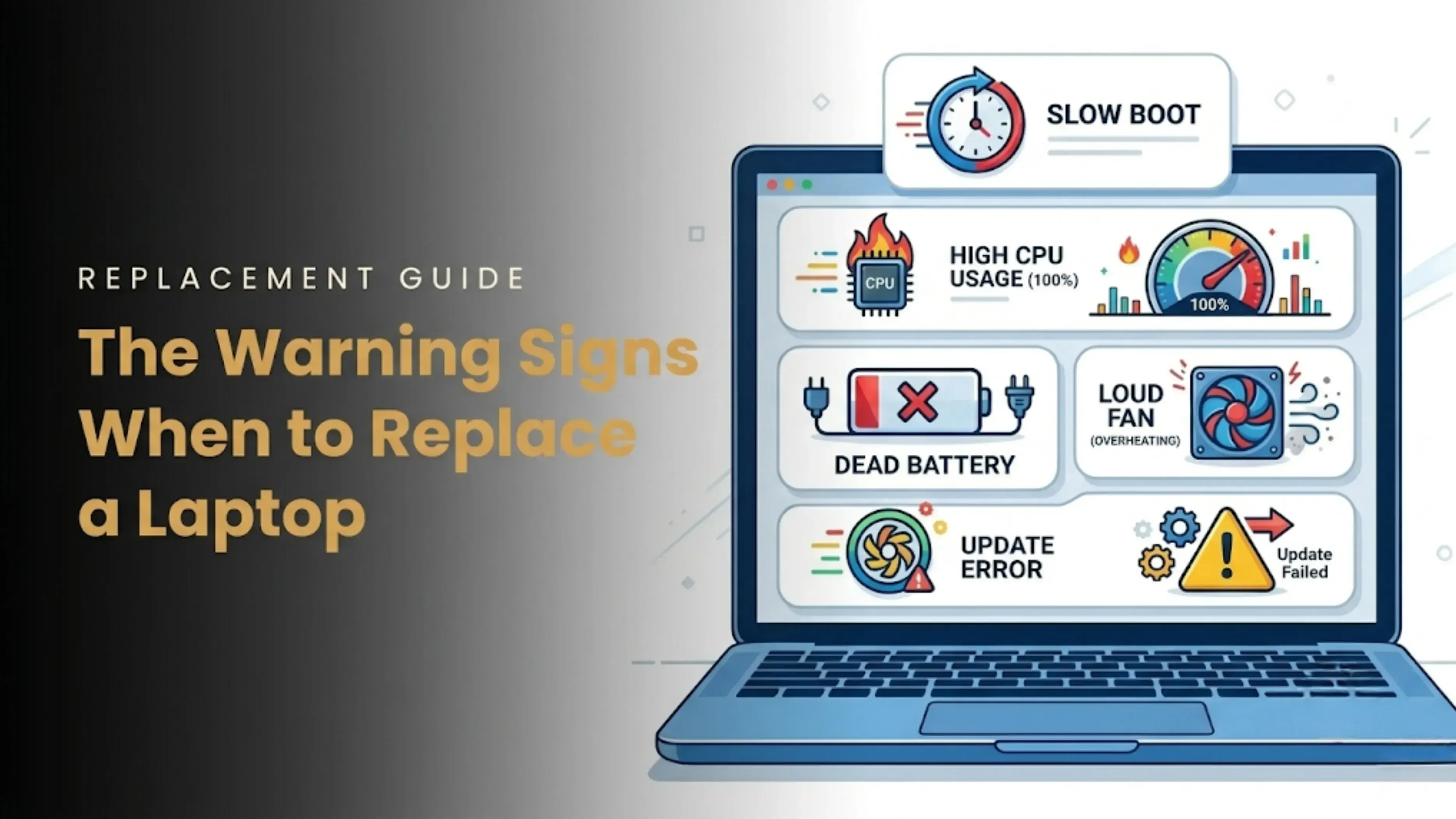
You don’t need a diagnostic tool to know when it’s time. Your laptop will literally tell you. Here are the undeniable signs you need a new laptop:
It takes 5+ minutes to boot up after you’ve already logged in.
You open Task Manager, and your RAM and CPU are pegged at 100% with nothing open.
Advertisement
The battery dies faster than your phone’s.
The fan runs constantly, even when you’re just on the desktop.
You get pop-ups saying you can’t install the latest macOS or Windows update.
The screen is cracked, the hinge is loose, and three keys are missing.
If you’re nodding your head to three or more of these, we’re officially at the “should you repair or replace your laptop” crossroads.
If the problem is a dead battery or a little storage update and your machine is less than three years old, fix it! You may extend its lifespan by two years if you replace the SSD, add more RAM, and clean the fans. Maintaining a laptop goes a long way.
But if your processor is outdated, the motherboard is fried, or the machine is over 6 years old? Let it go.
Here’s my golden rule: If the repair costs more than 50% of what a new mid-range machine costs, you replace it. Don’t throw good money after bad.
And here’s a pro-tip regarding money: Don’t wait until your laptop is a paperweight to think about its value.
I know it sounds crazy to think about selling a slow laptop, but if it still turns on and holds a charge, it has resale value. People are always looking for cheap old laptop backups for their kids or home servers. If you’re already thinking about upgrading, do a quick search to see what yours is worth today.
For instance, you can quickly check your laptop’s current market price on sites like Cashkr just to get a baseline. It takes two minutes and gives you a realistic number so you don’t get lowballed later. Knowing that number helps you decide: “Do I squeeze one more year out of this, or do I sell it now while it’s still worth something?”
How to Make Your Laptop Last Longer (Without Becoming a Tech Geek)
You don’t need to be an IT wizard to extend that clock. Here’s the practical stuff that actually works:
1. Keep the Vents Clear Give up using your laptop on your lap, blanket, or bed (ironic, huh?). Dust is trapped, and ventilation is blocked by the fabric. Make use of a hard desk.
2. Upgrade the Right Parts The least expensive approach to postpone a purchase by two years is to upgrade to an SSD and max out the RAM if your laptop permits it. It revitalizes outdated hardware.
3. Baby the Battery Don’t keep it plugged in at 100% all day every day. If you’re desk-bound, use a tool to limit the charge to 80%. Your battery health will thank you in year three.
4. Don’t Skip Updates I get it, updates are annoying. But those software updates and driver patches fix security holes. A virus will kill your laptop performance way faster than aging hardware will.
5. Physical Protection Purchase a $20 sleeve. More "deaths" are caused by spilled coffee and dropped backpacks than by malfunctioning motherboards. The first step in making a laptop last is to treat it like the pricey glass-and-metal sandwich that it is.
Frequently Asked Questions (The Short Versions)
Can a laptop last 10 years? Physically? Yes. Practically? No. After 8 years, it won’t run modern browsers smoothly, and you’ll be a security risk without updates.
How often should you replace a laptop? For the average person, every 5 to 7 years is the sweet spot. You get the best balance of cost, speed, and security.
Does more RAM increase laptop lifespan? Not physically, but it extends its useful life. Upgrading RAM stops it from feeling obsolete too quickly.
Does replacing the battery make a laptop last longer? Only if the battery was your only complaint. If the CPU is maxed out, a new battery won’t fix your slowness.
Is an SSD better than an HDD? Is a sports car better than a minivan? For speed and reliability, 100% yes. An SSD is non-negotiable in 2026.
Final Thought
We all become dependent on our devices. Our work, our pictures, and our late-night browsing histories are all stored there. However, the question is not only how long a laptop will endure, but also how long you should keep it until it starts to cost you money, time, and sanity.
If you’re constantly waiting for it to catch up with you, you’ve already lost. Sell it while it’s still decent, put that money toward your next machine, and start fresh. You’ll wonder why you waited so long.
1. How long does a laptop typically last before it starts slowing down?
Around the age of three or four years, most laptops begin to display their age. At that point, your once-fast computer starts to lag because newer software requires more resources. Boot times, multitasking, and loading larger webpages are when you'll notice it the most.
2. Can a laptop last 10 years if I take really good care of it?
Physically, yes. I’ve seen ancient laptops that still power on. But practically speaking, a 10-year-old laptop is going to struggle with modern browsers, video streaming, and basic multitasking. You’ll also miss out on critical security updates, which makes it a risk to use online.
3. Is it worth replacing the battery on an old laptop?
Only if the rest of the machine still meets your needs. If your processor and RAM are decent and you’re just annoyed by the short battery life, go for it. A new battery costs far less than a new laptop. But if the whole system feels sluggish, a fresh battery won’t fix that.
4. How do I know if I should repair or replace my laptop?
My straightforward guideline is to replace a laptop if the cost of repairs exceeds half that of a similar new model. Repair the machine if it falls below that, and it is under four years old. Think about whether the repair resolves your main issue as well. It is nearly always worthwhile to upgrade RAM or switch to an SSD. Usually, it's not necessary to replace a fried motherboard.
5. Does upgrading RAM and SSD really extend laptop lifespan?
Absolutely. In fact, this is the single best thing you can do. Adding more RAM and switching from an old HDD to an SSD can make a 5-year-old laptop feel almost brand new for everyday tasks. It won’t make the hardware last longer physically, but it extends its useful life by years.
6. What kills a laptop the fastest?
Dust and heat, without a doubt. Your laptop's interior components are gradually cooked when it overheats frequently. Due to their tendency to overheat when under strain, gaming laptops suffer the most. Heat is the quiet, slow killer, but physical harm like spills and drops is also a key factor.
7. How often should I replace my laptop if I use it for work every day?
For daily workhorses, aim for every 4 to 6 years. Business laptops are built tougher, so they can stretch to 7 years. But if your work involves video editing, coding, or heavy data crunching, you might feel the need to upgrade closer to the 4-year mark.
8. Will installing the latest operating system updates slow down my laptop?
Sometimes, yes. New updates are optimized for newer hardware, so older machines can struggle. That said, you shouldn’t skip updates entirely because they patch security holes. If your laptop is more than 6 years old and a major OS update pops up, do some research first. Other users might warn you it’ll slow things down.
9. Does using my laptop while plugged in all the time damage the battery? It's not perfect. Maintaining a constant 100% charge puts additional strain on the battery and reduces its longevity. Look for battery management software that restricts charging to about 80% if you spend most of your time at a desk. Your battery will have a much longer lifespan.
10. What’s the best way to check my laptop’s resale value before upgrading? Don’t guess. A quick online search will give you a ballpark. You can check sites like Cashkr by selecting your laptop model and answering a few questions about its condition. It takes just a couple of minutes and gives you a realistic number. That way, you know whether to sell now while it’s still worth something or hold onto it for another year.