Cashkr Logo
iPhone 13
Mobile
  • Apple
  • Samsung
  • Google
  • OnePlus
Tablet
  • iPad
  • Samsung
  • Lenovo Tab
Laptop
  • Dell
  • HP
  • Lenovo
Mac
  • iMac
  • Mac Studio
  • Mac Mini
  • Macbook Pro
Watch
  • Apple
  • Samsung
  • Google
  • OnePlus
Camera
  • Canon
  • Nikon
  • Sony
  • GoPro
Headphone
  • Apple
  • Bose
  • Samsung
  • Nothing
Console
  • Sony
  • Microsoft
EnterpriseDevice Hub
Cashkr app

Get the Cashkr app for faster payouts

Open app
Cashkr Logo

Popular Searches

  • Apple iPhone 13
  • iPad Pro 11-inch Wi-Fi 2020
  • OnePlus Pad Go LTE
  • Mac mini M1
  • MacBook Air M2
  • iMac Retina 5K 27-inch 2017
  • HP Victus
  • Dell Latitude
  • Lenovo Legion

Loading....

Cashkr logo

BIGBOLD TECHNOLOGIES PRIVATE LIMITED (operating as Cashkr) is a technology-driven device buyback company, with a belief that every gadget deserves a second life. Our aim is to build tech-enabled doorstep solutions that make selling old phones, laptops, tablets and MacBooks simple, transparent and rewarding for everyone.

Check if Cashkr is right for you?

Company

  • About Us
  • Enterprise
  • Partner with us
  • Price Calculator
  • Refer & Earn
  • Guides
  • Articles
  • Careers

Services

  • Sell Old Phone
  • Sell Old Tablet
  • Sell Old Laptop
  • Sell Old MacBook
  • Sell iPhone
  • Sell iPad

Help & Support

  • Sitemap
  • Contact Us
  • Support

Life at Cashkr

  • Explore With Cashkr
  • Cashkr News
  • Cashables
  • Coupons
Download on App StoreGet it on Google Play

Download Cashkr App to sell Phones, Laptops, Tablets and MacBooks

Indemnity FormPrivacy PolicyTerms of UseCookie PolicyReturn & Refund Policy

© 2026 BigBold Technologies Pvt Ltd , All Rights Reserved · CIN: U47912MH2025PTC447159 · Registered Under Govt. of India

** All trademarks, logos, and brand identities are the property of their respective owners. Any company names, logos, product names, and service names mentioned on this website are solely for identification purposes. The use of such trademarks, logos, and brand identities does not constitute or imply any endorsement.

  • Search Results
  • No Result Found
HomeArticlesHow to Avoid Scams When Selling Your Phone Online in India
Buying & Upgrade Guides

How to Avoid Scams When Selling Your Phone Online in India

Yaskar Jung ShahYaskar Jung ShahPublished at: Jun 22, 2025·9 min read
How to Avoid Scams When Selling Your Phone Online in India

Spot OLX and UPI scams before you hand over your phone.

Follow Cashkr on GoogleAdd us as a preferred source to see our stories first in SearchAdd as preferred source
    • Payment Scams
    • Scams at the Handover
    • Scams That Happen From a Distance
    • Do These Things Before Any Sale
    • Where the Real Risk Is
    • If You Sell to Us
    • FAQs

How to Avoid Scams When Selling Your Phone Online in India

Most advice says "use a trusted platform" and stops there. That does not help you much. You are standing outside with a stranger. He is holding your phone. He is showing you a payment screenshot. What now?

This guide shows you how each scam works. Once you see how it works, you can spot it. Every scam below is one that sellers in India report again and again.

Payment Scams

These are the ones that cost you money. They all work the same way. You give the phone away before the money is really in your account.

Advertisement

The fake screenshot scam: The buyer shows you a screenshot that looks like a completed transfer. It has your name, the amount, and a reference number, so it seems real. But it is only a picture, which is easy to fake or reuse. No money was actually sent.

What to do: Open your own bank or UPI app and check your balance yourself. Do not rely on the buyer’s phone. Do not trust excuses like "it is processing" or "banks are slow today." Real UPI payments show up in seconds.

Explain with :ChatGPTClaudePerplexityGoogle AIGrok
Recommended for you

Sell with Cashkr

Got an old phone lying around?

Cashkr buys used devices at a fair price with free doorstep pickup and same-day payment across 2,000+ pincodes. Get an upfront quote in seconds.

Sell Old Phone OnlineCheck your phone's value in seconds
Sell Old Laptop OnlineSell Old Tablet OnlineSell Old Mac Online
Buying & Upgrade Guides
Yaskar Jung Shah

Written by

Yaskar Jung Shah

Advertisement
Advertisement
In this article
    • Payment Scams
    • Scams at the Handover
    • Scams That Happen From a Distance
    • Do These Things Before Any Sale
    • Where the Real Risk Is
    • If You Sell to Us
    • FAQs

What's your device worth?

Free doorstep pickup and same-day payment across 2,000+ pincodes.

Sell PhoneSell LaptopSell TabletSell Mac
Advertisement

Stay in the loop

Weekly tech insights in your inbox. No spam, ever.

Follow Cashkr

The UPI collect request scam: This trick uses your own app against you. The buyer sends you a collect request, which is actually a request for money, not a payment. He may claim it is your payment and ask you to approve it. If you enter your PIN, you end up sending money to him.

What to do: remember one rule. Getting money never needs your PIN. If your phone asks you for a PIN, you are paying, not being paid.

The overpayment refund scam: The buyer claims he sent too much money by mistake and often shows a fake screenshot. He asks you to send the extra amount back, so you end up sending real money for a payment that never arrived.

What to do: Never send a refund. If the extra money is real, ask the buyer to contact his bank.

The pending transfer scam: The buyer shows you a screenshot saying the transfer is "in process" and claims he is in a hurry. He asks for the phone right away. Since NEFT and IMPS transfers can be slow, this trick can seem believable.

Scams at the Handover

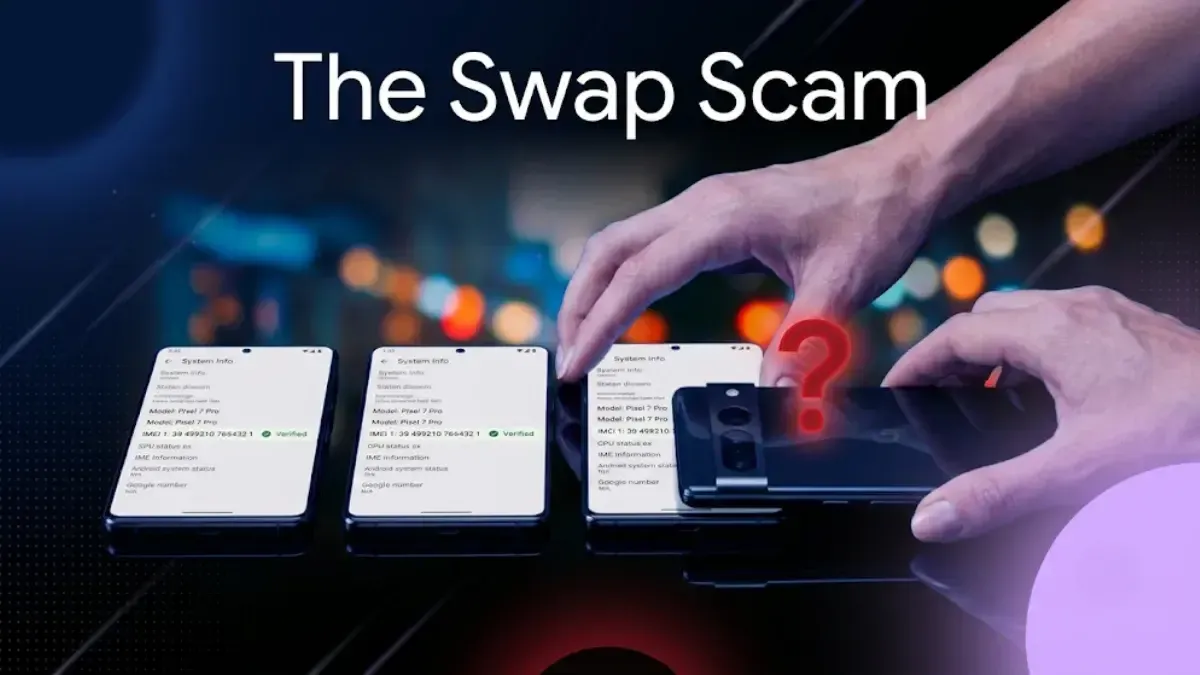
The swap scam: You meet the buyer, and he checks your phone. When he returns it, he gives you a different phone that looks the same, or even a dummy phone. You may not notice until much later.

What to do: Write down your IMEI before meeting the buyer. Dial *#06# and take a photo of the number. When you get the phone back, check the IMEI again. Keep your hand on the phone while the buyer examines it.

The walk-away scam: The buyer asks to test the camera outside or check the network, then simply walks away with your phone.

What to do: Always keep the phone in sight and within reach. Meet the buyer somewhere you feel comfortable and in control.

The bait-and-switch quote: You receive an online quote for a certain amount, but when the agent arrives, he finds faults and offers much less. He hopes you will accept because you have already begun the process.

What to do: Before booking, ask if the quote is fixed or just an estimate. Be honest about any faults when getting the quote, so there are no surprises later. Be prepared to say no at your door. A good service will not pressure you.

250.webp

Scams That Happen From a Distance

The advance fee scam: A buyer or a fake buyback website asks you to pay a small fee first, calling it pickup charges, insurance, or verification. They promise a high price later, but you lose your money.

The OTP request scam: Someone claims to be the buyer, courier, or a platform agent and asks for the OTP sent to your phone. That OTP is actually approving something on your accounts, not confirming the sale.

The courier claim scam: You send the phone, but the buyer claims it never arrived or says it was broken. He asks for his money back and keeps your phone.

What to do: Record a video while packing and sealing the box. Use a tracked and insured courier. If possible, avoid sending a phone to a private buyer.

Do These Things Before Any Sale

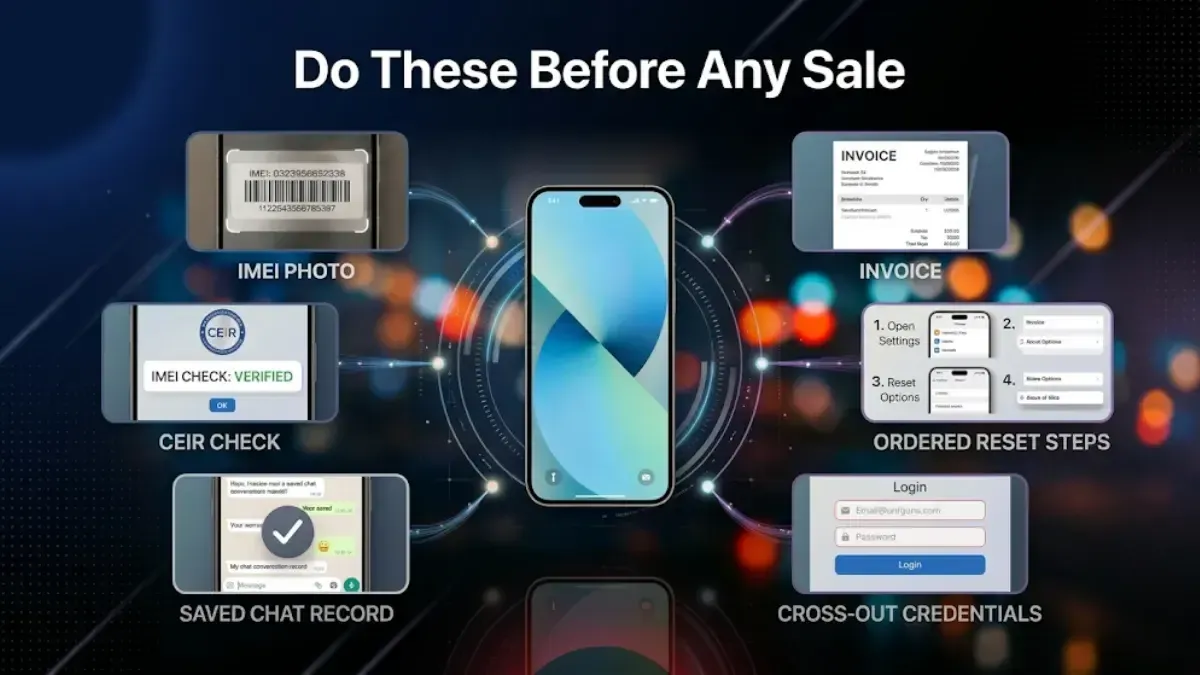
Note your IMEI. Dial *#06# and take a photo. This proves which phone was yours.

Keep the bill. It settles most arguments. It also adds a little to your price.

Back up your data first, then sign out of your Apple ID or Google account, and finally do a factory reset. The order is important. If you reset while still signed in, the phone stays locked to you and the buyer cannot use it.

Never share account details. Not your bank password. Not your Apple ID. Not your Google password. Not an OTP. A buyer never needs any of these.

Keep a record. Save the chat, the agreed price, and the payment confirmation from your own bank.

Check the IMEI is clean. If the phone was ever reported lost or stolen, the buyer will find out and the sale will fail.

251.webp

Where the Real Risk Is

Private sales pay the most. They also carry the most risk. Every scam above, except the bait-and-switch quote, is a private-sale scam.

Buyback services and exchange offers remove most of that risk. A company pays you after it checks the phone. No stranger sends you money. That is their real advantage. The trade-off is a lower price.

Neither choice is wrong. Just know which risk you are taking.

If You Sell to Us

If you sell on Cashkr, you will get an online quote and can book a free pickup at your home. We check the phone to match the condition you described. Once you agree, we pay you by UPI or bank transfer. No strangers, no bargaining, and no waiting for payments to clear.

Check what your phone is worth.

FAQs

1. How do I know a buyer has really paid?

Open your own bank app or UPI app and check that your balance has changed. A screenshot on his phone proves nothing. Neither does a message saying the transfer is pending.

2. What is a UPI collect request and why is it dangerous?

It is a request for money, not a payment. If someone sends you one and says it is your payment, entering your PIN sends money to him. Getting money never needs your PIN.

3. Should I ever refund an overpayment?

No. Tell the buyer to ask his bank. This scam works by making you send real money back for a payment that never came.

4. How do I prove which phone was mine?

Dial *#06# before the sale and photograph your IMEI. Keep the original bill too. Together, they show which phone you owned.

5. Is it safe to post a phone to a buyer?

It is the riskiest way to sell. Buyers can claim it never came or came broken. If you must post it, film the packing, use a tracked and insured courier, and never post it before the money is in your account.

6. Can someone get into my accounts after I sell the phone?

Not if you back up, sign out of your Apple or Google account, and then do a factory reset, in that order. Modern phones encrypt their storage, so a reset makes the old data unreadable.

7. Is a buyback service safer than selling privately?

For payment risk, yes. A company pays you, not a stranger. The trade off is a lower price. One thing to ask any buyback service is whether the quote is fixed before pickup or can change at your door.


Advertisement

Trending in Buying & Upgrade Guides

01Where to Sell Your Phone in India: Every Option Compared02iPhone Resale Value in India: How Much Is Your Old iPhone Worth?03What to Do With Old Phones: Sell, Hand Down, Reuse or Recycle04When to Upgrade Your Phone: The Signs That Matter and the Ones That Do Not05When to Sell Your Phone: How Timing Changes Your Phone's Resale Value

Latest

How to Factory Reset an Android Phone: Complete Step by Step GuideAug 23, 2026How to Factory Reset a Samsung Tablet: Complete Step by Step GuideAug 20, 2026Mobile Selling Websites in India: Which One Actually Pays You MoreAug 19, 2026 How to Sell a Broken, Damaged or Dead Phone Online in IndiaAug 12, 2026Smartphone Price Hike 2026: How to Buy Well When Prices Are RisingJul 31, 2026

Keep Reading

Where to Sell Your Phone in India: Every Option Compared

Where to Sell Your Phone in India: Every Option Compared

Buyback, classifieds or exchange: where to sell your old phone

Buying & Upgrade Guides•May 11, 2026•By Yaskar Jung Shah
iPhone Resale Value in India: How Much Is Your Old iPhone Worth?

iPhone Resale Value in India: How Much Is Your Old iPhone Worth?

What your old iPhone is worth, checked against its launch price

Buying & Upgrade Guides•Mar 23, 2026•By Yaskar Jung Shah
What to Do With Old Phones: Sell, Hand Down, Reuse or Recycle

What to Do With Old Phones: Sell, Hand Down, Reuse or Recycle

Sell old devices and declutter your space with Cashkr’s easy process.

Buying & Upgrade Guides•Jun 22, 2025•By Yaskar Jung Shah
When to Upgrade Your Phone: The Signs That Matter and the Ones That Do Not

When to Upgrade Your Phone: The Signs That Matter and the Ones That Do Not

When to upgrade your phone: the real signs, and the wants.

Buying & Upgrade Guides•Jun 24, 2025•By Yaskar Jung Shah
When to Sell Your Phone: How Timing Changes Your Phone's Resale Value

When to Sell Your Phone: How Timing Changes Your Phone's Resale Value

Learn the best time to sell old smartphone & boost resale with Cashkr.

Buying & Upgrade Guides•Jun 22, 2025•By Nirajan Bohara
4G to 5G: Can You Actually Convert Your Phone?

4G to 5G: Can You Actually Convert Your Phone?

Upgrade to 5G smartphones for faster speeds and better performance.

Buying & Upgrade Guides•Jun 20, 2025•By Yaskar Jung Shah

Topics

  • Smartphone
  • Comparison5
  • laptop4
  • Price & Value Guides5
  • Tech News & Trends
  • Buying & Upgrade Guides18

Quick Guides

Lost Your Android Phone? How to Use Find My Device (Now Find Hub)How to Recycle Old Devices in India and Get PaidHow to Sell Refurbished Devices Online & Maximize ProfitMistakes to Avoid When Selling Your Old Phone
All guides →

Just Published

Browse all →
How to Factory Reset an Android Phone: Complete Step by Step Guide

How to Factory Reset an Android Phone: Complete Step by Step Guide

How To•Aug 23, 2026
How to Factory Reset a Samsung Tablet: Complete Step by Step Guide

How to Factory Reset a Samsung Tablet: Complete Step by Step Guide

How To•Aug 20, 2026
Mobile Selling Websites in India: Which One Actually Pays You More

Mobile Selling Websites in India: Which One Actually Pays You More

Recent News•Aug 19, 2026
 How to Sell a Broken, Damaged or Dead Phone Online in India

How to Sell a Broken, Damaged or Dead Phone Online in India

How To•Aug 12, 2026
Smartphone Price Hike 2026: How to Buy Well When Prices Are Rising

Smartphone Price Hike 2026: How to Buy Well When Prices Are Rising

Buying & Upgrade Guides•Jul 31, 2026

Explore More Topics

All ArticlesSmartphoneComparisonlaptopPrice & Value GuidesTech News & TrendsBuying & Upgrade GuidesRecent NewsHow ToReviewMobile PricesTabletsWearables