How to Find a Lost Android Phone: What Find Hub Can Do Now
You reach into your pocket and the phone is not there. You check the bag, the desk, the sofa cushions. Nothing.
If you are wondering how to find a lost Android phone, your phone already has the answer. Any Android signed in to a Google account comes with a free tool that can show its location, ring it loudly, lock it, or erase it if needed. You do not need to install anything.
First, a quick note, because this can be confusing. Google now calls the service Find Hub. Many guides still use the old name, Find My Device, so searching your Settings for that might not work. Some phones still show the old name, but it is the same service.
Advertisement
Disclosure: Cashkr is our own device buyback service. This guide is not about selling anything. We have included it because a stolen phone with a blocked IMEI cannot be used or sold by anyone, and that is something we deal with constantly.
Yaskar Jung Shah leads content at Cashkr, an Indian device buyback service. He writes about resale value, data safety and what actually happens to a device after it is sold. He checks every figure against a dated, named source, and says so when a number cannot be verified.
Open google.com/android/find on any device, sign in with your Google account, and see if your phone appears on the map. Google also offers the shorter address android.com/find, which leads to the same place.
If your phone shows up, you are set up and can skip to the recovery steps. If not, the setup section below takes about a minute.
Set It Up Before You Need It
It is usually already turned on, but it only takes a few seconds to check.
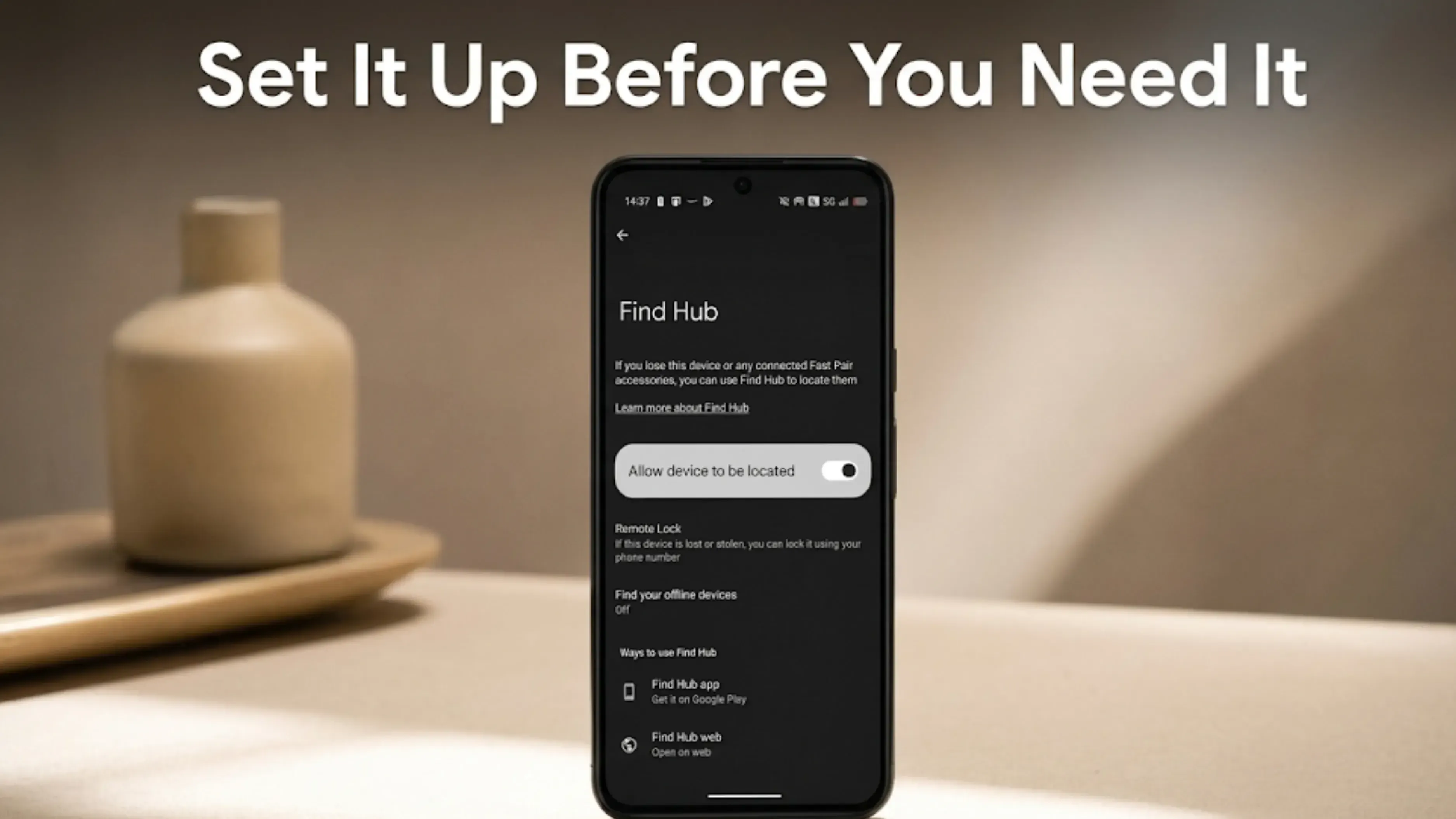
Open Settings, then Security, then Find Hub, and check that Allow device to be located is on. If your Settings search finds nothing for Find Hub, try Find My Device instead, because your phone may not have been renamed yet.
While there, look for Find your offline devices and switch it on. Google lists this under Settings, Security, Find Hub on its Pixel page, and under Settings, Google, All Services, Find Hub on its general Android page, so the path varies by phone. Set it to work with the network, and make sure Bluetooth and Location are on.
Here are two more things you should do, and they are both free.
One. Google says if you hide a device on Google Play, you will not find it in Find Hub. So leave it visible.
Two. Write your Google account email somewhere other than your phone. A notebook, another email account, anywhere. You will need it to sign in when the phone is gone, and if the only copy is on the missing device you are stuck.
Why an Offline Phone Is Not Always Untraceable
This part is new, and most guides have not updated yet.
Find Hub now uses what Google calls "a crowdsourced network of Android devices that uses end-to-end encrypted location information". In plain terms, other Android phones nearby can help locate your device over Bluetooth, even when yours has no mobile data or Wi-Fi.
And on some phones it goes further. Google says that on supported devices, including the Pixel 8, Pixel 9 and Pixel 10 series, the network "can locate your phone for several hours even if the battery runs out or the device is powered off".
So a phone that is turned off is not always lost for good. It depends on your phone model and whether you turned on offline finding earlier. That is why it is best to set it up now, not wait until you need it.
If Your Phone Is Missing Right Now
This is what most people need: how to find a lost Android phone right away. Act fast, because if the battery dies or someone turns the phone off, your options become limited.
Borrow any device with a browser. A laptop, a tablet, or a friend's phone. Nothing to install.
Go to google.com/android/find. Searching Google for "find my phone" while signed in also brings up a map straight in the results.
Sign in with the same Google account that is on the lost phone. If two step verification is on, Google sends a code to your recovery number or backup email, which is another reason to set those up in advance.
Pick the right device from the list if you have more than one.
Then read the map carefully. Zoom in for the street or the building. Check the timestamp, because it shows whether the position is live or old. The time matters as much as the dot.
Which Action to Choose
Google offers three, and the names have changed, so here they are as they appear now.
Play sound, when you think the phone is nearby. At home, in the office, down the side of a car seat. Google's description: it "Rings your device at full volume for 5 minutes, even if it's set to silent or vibrate."
Mark as lost, when someone else might have it or it is in a public place. Google says this "Locks your device with your PIN, pattern, or password" and disables access to notifications, widgets and quick settings. Do this first if the phone might not just be misplaced.
Factory reset, only when you are certain it is gone for good. Google is clear: "When you factory reset a device, it will no longer be available in Find Hub." Tracking stops permanently. Google also notes the reset may not delete SD cards, so a memory card is a separate worry.
The order matters. Lock first. Reset only after you have given up on getting it back.
This remote reset is not the same thing as the reset you run before selling a phone, and the two get confused.
One thing to know: to lock or reset the phone, Google says the device must have power, be connected to mobile data or Wi-Fi, be signed in to a Google account, have Find Hub on, and be visible on Google Play. A phone that is off will not receive the command until it comes online.
Other Ways to Track It
Samsung phones have their own tool at findmymobile.samsung.com, signed in with a Samsung account. It does some things Google's does not.
Xiaomi, Redmi and Poco phones use Mi Find Device at i.mi.com with a Mi Account.
Google Maps Timeline will not track live, but it shows where your phone has been. Open maps.google.com, go to your profile, choose Your Timeline, and look at today. Useful for retracing your steps when you have no idea where you left it.
Call your own number. Obvious, and it works more often than people expect. If you were at a restaurant, a shop or a cinema, ring them and ask whether anything was handed in.
If It Was Stolen
If the map shows somewhere unfamiliar, or the location is moving, treat it as stolen.
Do not try to get it yourself. This matters more than the phone. If the location is unfamiliar, do not go alone or at night. Give the location to the police.
Lock it immediately with Mark as lost.
Get your IMEI and file a complaint. The IMEI is a 15 digit number unique to your phone. Dial *#06# on any phone to see it, or find it on the original box or invoice. File an FIR at your nearest police station and include the IMEI.
Then block the IMEI. In India you can have the handset blocked nationwide through the government CEIR service on the Sanchar Saathi platform, at ceir.sancharsaathi.gov.in. A blocked IMEI cannot connect to any Indian network on any operator, which makes the phone useless to whoever has it. Our guide on checking an IMEI number in India explains how the same service works in the other direction, when you are buying or selling.
Block your SIM. Call Jio, Airtel, Vi or BSNL and have the number blocked immediately. They will issue a replacement SIM with the same number. Until then, anyone holding the phone can receive your one time passwords.
Secure your accounts. Go to myaccount.google.com, then Security, then Your Devices, and sign the lost phone out. Change your Google password, then change passwords on banking apps, UPI apps, email and social media.
Call your bank. If any banking app used fingerprint or face login on that phone, call the bank's helpline and have that device deregistered. Most Indian banks run this round the clock. This step is often forgotten but matters most financially.
Five Things Worth Doing Today
Everything above is about what to do after the phone goes missing. These five make finding a lost Android phone much easier if it ever happens, and ten minutes now saves a bad afternoon later.
Check Find Hub is on, under Settings, Security, Find Hub, and switch on offline finding if your phone offers it.
Write your Google account email somewhere that is not your phone.
Note your IMEI. Dial *#06# and save it in your email or write it down.
Set up your Google recovery phone number and backup email, so two step verification does not lock you out at the worst moment.
Back up regularly, under Settings, Google, Backup. If the phone is ever erased remotely, you lose the device and nothing else.
If You Get It Back
If the IMEI was blocked and the phone has since turned up, unblock it through the same CEIR portal before you do anything else. A blocked phone cannot be used or sold by anyone, including you.
And if the scare made you realise you had stopped trusting the phone anyway, that is a reasonable moment to decide. This is the part where we have an interest, so read it that way. A phone sitting in a drawer because you no longer rely on it is losing value every month, our guide on selling your phone safely covers the steps in order.
FAQs
1. How do I find a lost Android phone?
Open google.com/android/find on any device with a browser, sign in with the same Google account that is on the lost phone, and look at the map. Check the timestamp to see how recent the location is. Then choose Play sound if it is nearby, or Mark as lost if someone else may have it.
2. Can I find my Android phone if it is switched off?
Sometimes, which is a change from a few years ago. Find Hub uses a crowdsourced network of nearby Android devices over Bluetooth. Google says that on supported phones, including the Pixel 8, Pixel 9 and Pixel 10 series, it can locate the phone for several hours after the battery runs out. Otherwise, you see the last known location.
3. Is it still called Find My Device?
Google now calls it Find Hub. It is the same service. If your Settings still show the old name, your phone has not changed yet, so search for Find My Device instead.
4. How accurate is the location?
Outdoors with a clear GPS signal, usually close. Indoors or among tall buildings, it can be much less precise. The timestamp shows how recent the reading is, which matters as much as the position.
5. Can someone trace a phone using only the number?
No. Find Hub needs access to the Google account signed in on that phone. Anyone offering to trace a phone from the number alone, especially for a fee, is running a scam.
6. What happens after I factory reset the phone remotely?
Google says the device "will no longer be available in Find Hub". Everything is wiped and tracking stops permanently. Google also notes the reset may not delete an SD card. Only do this once you accept you will not get the phone back.
7. Does this work on an iPhone?
No. Apple has its own service, called Find My, which you reach at iCloud.com or through the Find My app on another Apple device.
8. Can a thief disable it?
A factory reset stops it working, which is why locking the phone quickly matters. Marking it as lost locks it with your PIN, pattern or password, and a locked phone is harder to reset, so locking early keeps tracking alive longer.
Sources
Google, "Be ready to find a lost Android device", for the setup steps, the Settings paths, the Google Play visibility requirement, and the statement about supported devices being locatable for several hours after the battery runs out
Google, "Find, secure, or erase a lost Android device", for the google.com/android/find address, the Play sound, Mark as lost and Factory reset actions and their descriptions, the requirements for securing or erasing a device, and the statement that a factory reset device is no longer available in Find Hub
Google, "Be ready to find a lost Pixel phone", for the Pixel 8, Pixel 9 and Pixel 10 series offline finding wording
Department of Telecommunications, Sanchar Saathi portal, for the CEIR blocking and unblocking service
Weekly tech insights in your inbox. No spam, ever.


 Yaskar Jung ShahPublished at: Nov 18, 2026·13 min read